Get your XRoute API key, make your first model call (text, image, video), and monitor usage in minutes.
Welcome to XRoute. Follow this quickstart guide to obtain your unified API key, send your first model request across unified OpenAI, Anthropic, or native multimodal endpoints, and monitor your usage in real time.
1
Obtain your API Key
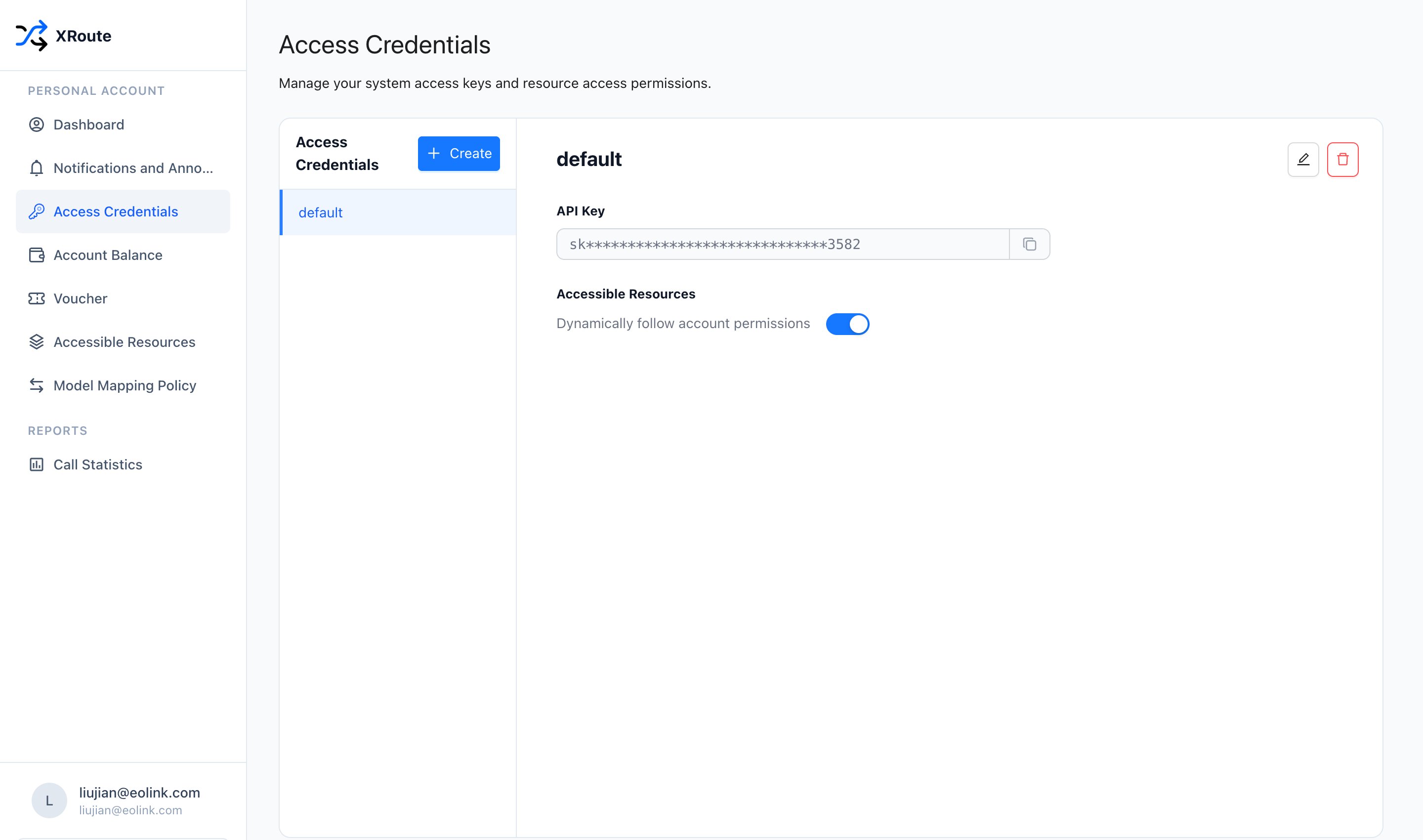
In the left sidebar of the personal console, click Access Credentials (https://xroute.ai/personal/keys).XRoute provides a default credential key out-of-the-box. Click the Copy icon next to the API Key input field to copy your secret key (sk-...).
Access credentials overview showing the default API Key and copy button
2
(Optional) Create a new API key
To isolate environments or control access permissions across different applications, you can create additional keys:
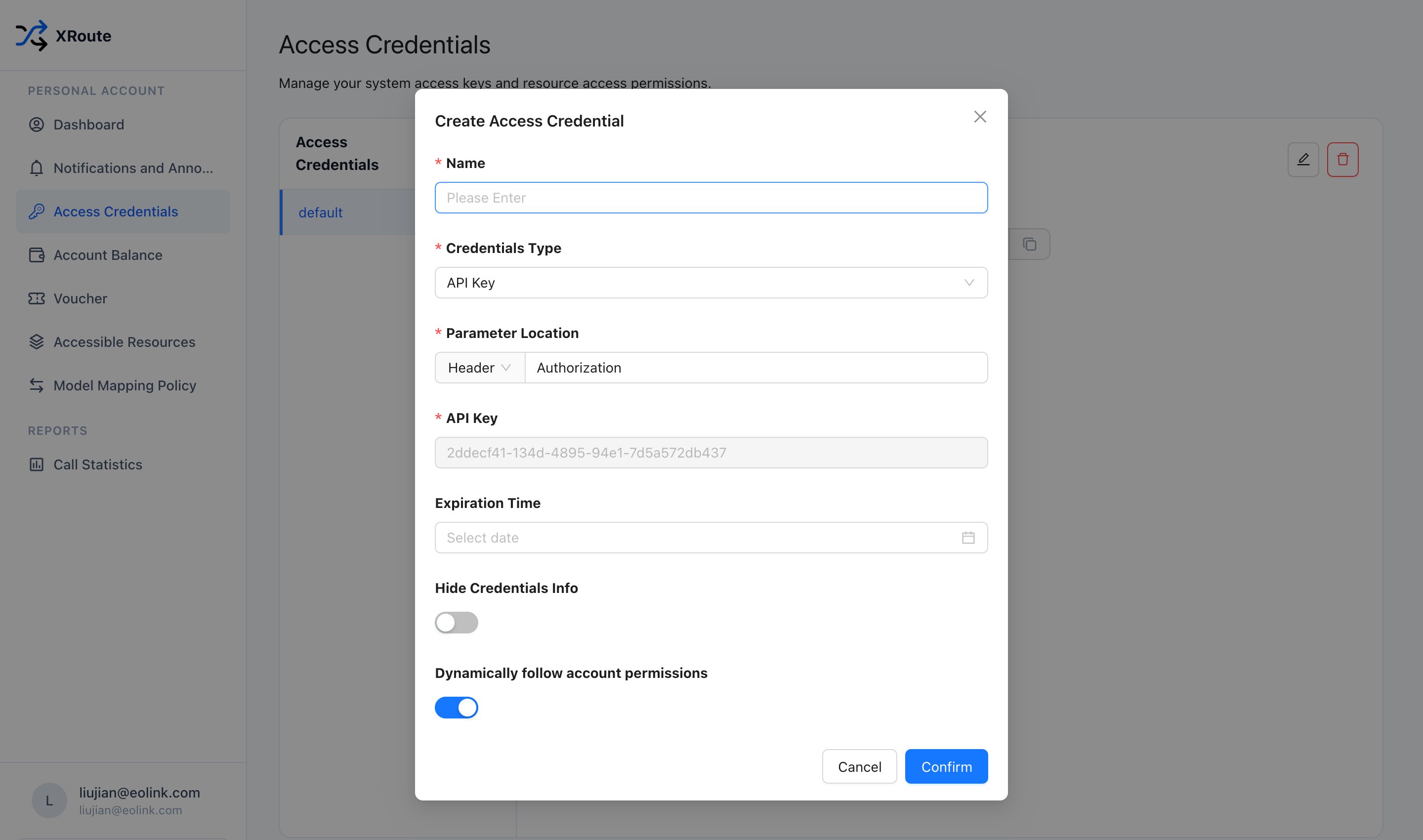
Click the + Create button at the top of the credentials list.
Enter a descriptive Name for your key (e.g. dev-agent or production).
Choose the authentication type (API Key), parameter location (Header: Authorization), and optional expiration date.
Click Confirm to generate the key.
Dialog for creating a new access credential
3
Quickest call: Copy pre-configured cURL from Dashboard
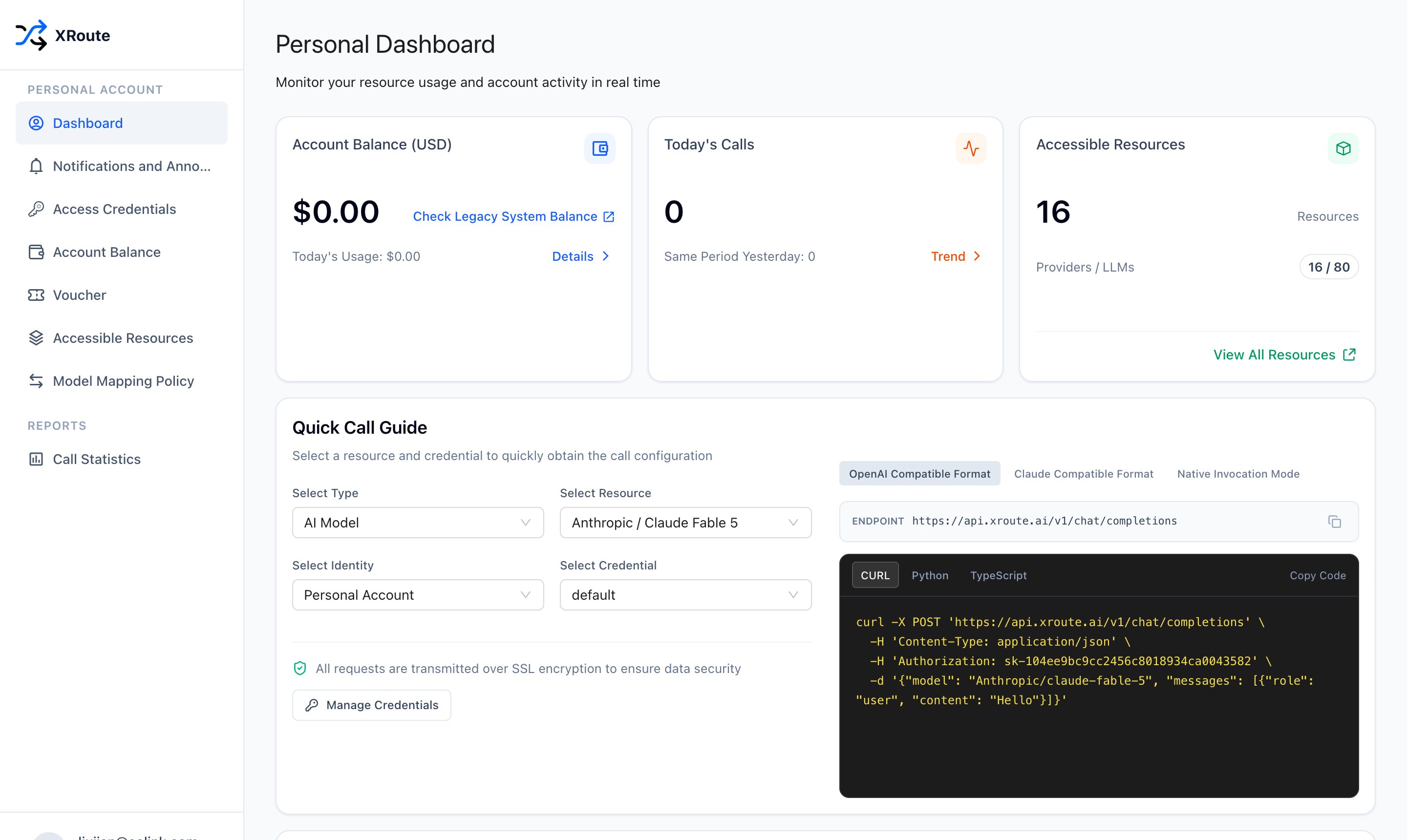
You do not need to manually assemble endpoint URLs, model identifiers, or headers. The XRoute Personal Dashboard provides a Quick Call Guide that automatically generates ready-to-run code with your secret key and chosen model pre-filled:
In the left navigation menu, click Dashboard (https://xroute.ai/personal/dashboard).
Under Quick Call Guide, choose your target AI Model and Credential (e.g. default).
Select your protocol format (OpenAI Compatible Format, Claude Compatible Format, or Native Invocation Mode).
Click Copy Code on the CURL tab, paste it into your terminal, and run it immediately!
XRoute Personal Dashboard Quick Call Guide with ready-to-copy cURL command
4
Export your API key in your environment
For programmatic usage with SDKs or command-line scripts, export the API key in your terminal session:
export XROUTE_API_KEY="sk_your_key_here"
Never commit your API keys to public repositories or expose them in client-side frontend code.
5
Send your first request
XRoute supports multiple generation modalities and protocols. Choose the format that fits your application:
Text Models: Support OpenAI Unified (https://api.xroute.ai/v1/chat/completions), Anthropic Unified (https://api.xroute.ai/v1/messages), and Provider Native formats.
from openai import OpenAIimport osclient = OpenAI( base_url="https://api.xroute.ai/v1", api_key=os.environ.get("XROUTE_API_KEY"),)response = client.chat.completions.create( model="OpenAI/gpt-6-astra", messages=[ {"role": "user", "content": "Hello! Explain why XRoute is useful in 2 sentences."} ],)print(response.choices[0].message.content)
import OpenAI from "openai";const openai = new OpenAI({ baseURL: "https://api.xroute.ai/v1", apiKey: process.env.XROUTE_API_KEY,});const completion = await openai.chat.completions.create({ model: "OpenAI/gpt-6-astra", messages: [ { role: "user", content: "Hello! Explain why XRoute is useful in 2 sentences." }, ],});console.log(completion.choices[0].message.content);
curl -X POST "https://api.xroute.ai/v1/messages" \
  -H "x-api-key: $XROUTE_API_KEY" \
  -H "anthropic-version: 2023-06-01" \
  -H "Content-Type: application/json" \
  -d '{
    "model": "Anthropic/claude-fable-5",
    "max_tokens": 1024,
    "messages": [
      {"role": "user", "content": "What makes a reliable API gateway?"}
    ]
  }'
curl -X POST "https://api.xroute.ai/OpenAI/images/generations" \
  -H "Authorization: Bearer $XROUTE_API_KEY" \
  -H "Content-Type: application/json" \
  -d '{
    "model": "gpt-image-2.5-flare",
    "prompt": "An ultra-modern data center glowing in cyberpunk neon lights, 8k resolution",
    "size": "1024x1024"
  }'
# 1. Submit video generation taskcurl -X POST "https://api.xroute.ai/Byteplus/contents/generations/tasks" \ -H "Authorization: Bearer $XROUTE_API_KEY" \ -H "Content-Type: application/json" \ -d '{ "model": "seedance-1-5-pro-251215", "content": [ {"type": "text", "text": "A drone flying through a sunset canyon, cinematic lighting"} ] }'# 2. Query task status with returned task_id# curl -X GET "https://api.xroute.ai/Byteplus/contents/generations/tasks/{task_id}" \# -H "Authorization: Bearer $XROUTE_API_KEY"
6
Check balance and call statistics
After making requests, you can monitor your account usage and API traffic directly in the console:
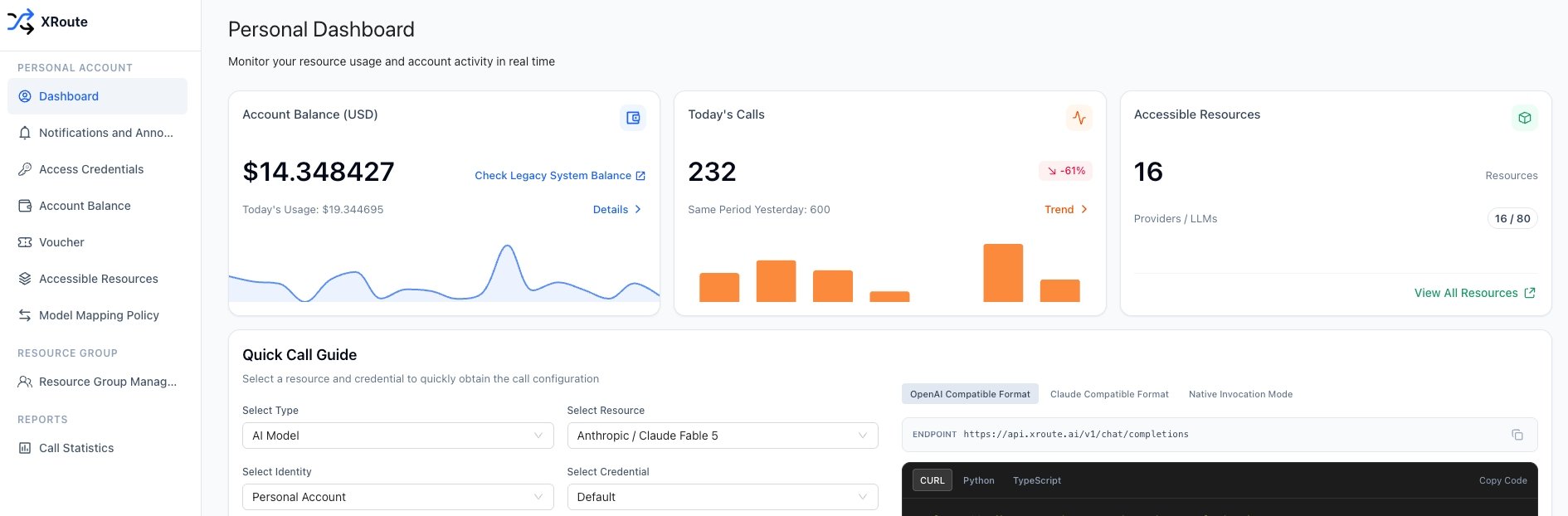
View balance and today’s usage on the Dashboard: Go to Dashboard (https://xroute.ai/personal/dashboard) to view your real-time Account Balance (USD), Today’s Usage, and total Today’s Calls.
Check your account balance and today's usage in the Personal Dashboard
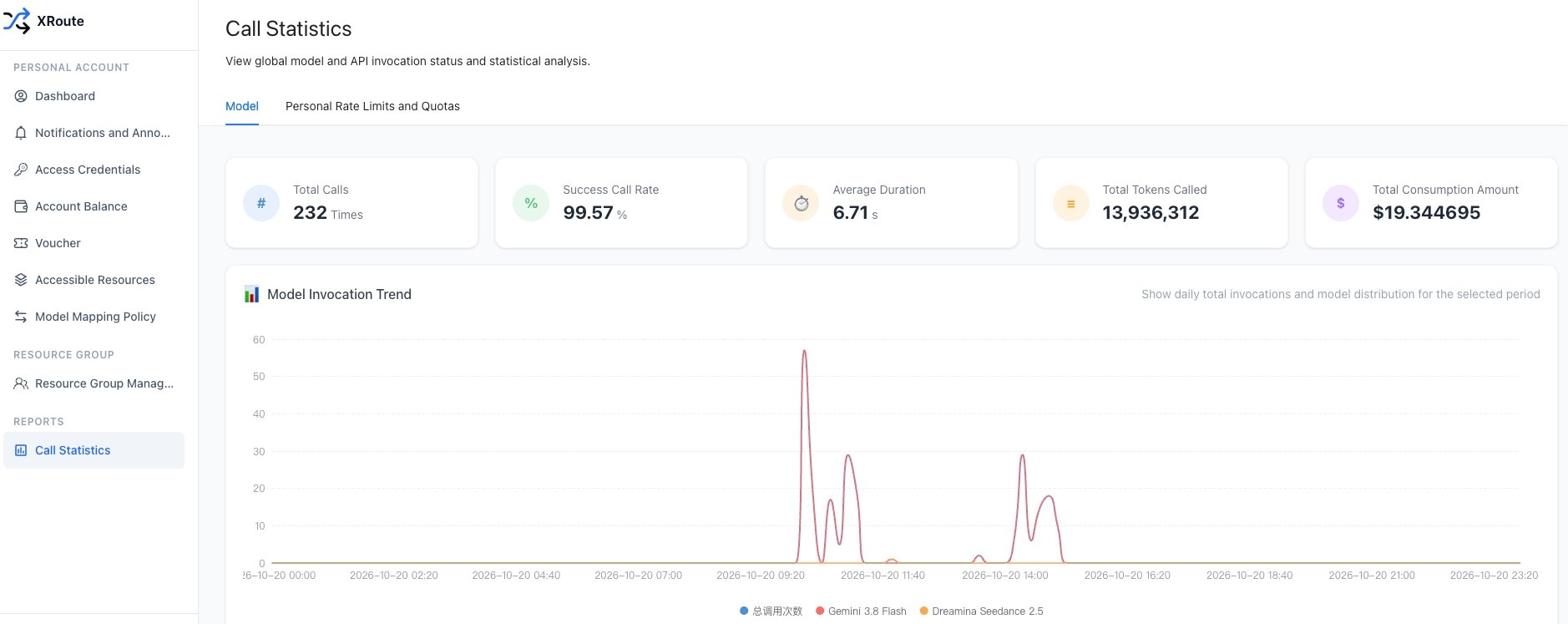
Inspect detailed invocation metrics in Call Statistics: Under REPORTS in the left sidebar, click Call Statistics (https://xroute.ai/personal/call) to analyze your model calls. You can view Total Calls, Success Call Rate, Average Duration, Total Tokens Called, Total Consumption Amount, and the real-time Model Invocation Trend breakdown chart.
Monitor model traffic, token consumption, and duration in Call Statistics
Next steps
SDK Compatibility
Use XRoute with OpenAI, Anthropic, LangChain, LlamaIndex, or Byteplus SDKs.
Model Catalog
Explore all supported LLMs, image generation, and video generation models.
XRoute Console
Manage access credentials, monitor real-time balance, configure model mapping failovers, and track call statistics.
Rate Limits & Errors
Understand default rate limits, retry mechanisms, and error codes.
{"docsConfig":{"theme":"mint","$schema":"https://mintlify.com/docs.json","name":"XRoute","colors":{"primary":"#1D68F9","light":"#4B89FF","dark":"#1554D1"},"logo":{"light":"https://mintcdn.com/aaa-fac9ff58/NTGzm45J7R-V4JOH/logo/light.png?fit=max\u0026auto=format\u0026n=NTGzm45J7R-V4JOH\u0026q=85\u0026s=49fd20287695b814c494d213faa2e1cf","dark":"https://mintcdn.com/aaa-fac9ff58/NTGzm45J7R-V4JOH/logo/dark.png?fit=max\u0026auto=format\u0026n=NTGzm45J7R-V4JOH\u0026q=85\u0026s=a52a8905146f6cce13a091636adccb5c","href":"https://xroute.ai"},"favicon":"https://mintcdn.com/aaa-fac9ff58/NTGzm45J7R-V4JOH/favicon.png?fit=max\u0026auto=format\u0026n=NTGzm45J7R-V4JOH\u0026q=85\u0026s=80657010d5a560ffe9fbfffbad22325f","navbar":{"links":[{"href":"https://xroute.ai/en/model","label":"Models"},{"href":"mailto:hello@xroute.ai","label":"Support"}],"primary":{"type":"button","label":"Get Started","href":"https://xroute.ai"}},"footer":{"socials":{"x":"https://x.com/xrouteai","github":"https://github.com/xrouteai"}},"contextual":{"options":["copy","view","chatgpt","claude","perplexity","mcp","cursor","vscode"],"display":"header"},"styling":{"latex":false},"navigation":{"languages":[{"language":"en","default":true,"navbar":{"links":[{"href":"https://xroute.ai/en/model","label":"Models"},{"href":"mailto:hello@xroute.ai","label":"Support"}],"primary":{"type":"button","label":"Get Started","href":"https://xroute.ai"}},"href":""},{"language":"zh","navbar":{"links":[{"href":"https://xroute.ai/en/model","label":"Models"},{"href":"mailto:hello@xroute.ai","label":"技术支持"}],"primary":{"type":"button","label":"立即开始","href":"https://xroute.ai"}},"href":"zh"},{"language":"ja","navbar":{"links":[{"href":"https://xroute.ai/en/model","label":"Models"},{"href":"mailto:hello@xroute.ai","label":"サポート"}],"primary":{"type":"button","label":"無料で始める","href":"https://xroute.ai"}},"href":"ja"}]}},"deployment":{"deploymentMetadataValue":{"subdomain":"aaa-fac9ff58","hasAudioNarration":false,"actualSubdomain":"aaa-fac9ff58","customDomains":["docs.xroute.ai"],"gitSource":{"type":"github","owner":"xpack-ai","repo":"docs","deployBranch":"main","contentDirectory":"","isPrivate":false,"mountPath":"","label":""},"feedback":{"thumbs":true,"edits":true,"issues":true},"entitlements":{"AI_CHAT":{"status":"DISABLED"},"WEB_MCP":{"status":"DISABLED"},"NARRATION":{"status":"DISABLED"}},"buildId":"6adf0ea71e2843fbec48dcc6","clientVersion":"0.0.4142","searchFilterCounts":[{"language":"en","tag":"Docs","count":16},{"language":"ja","tag":"ドキュメント","count":16},{"language":"zh","tag":"文档","count":16},{"language":"en","tag":"XRoute Console","count":9},{"language":"ja","tag":"XRoute コンソール","count":9},{"language":"zh","tag":"XRoute 控制台","count":9},{"language":"en","tag":"Overview","count":7},{"language":"ja","tag":"概要","count":7},{"language":"zh","tag":"概览","count":7},{"language":"en","tag":"API Reference","count":5},{"language":"en","tag":"Examples","count":5},{"language":"en","tag":"Use Cases","count":5},{"language":"ja","tag":"API リファレンス","count":5},{"language":"ja","tag":"活用事例","count":5},{"language":"ja","tag":"ユースケース","count":5},{"language":"zh","tag":"API 参考","count":5},{"language":"zh","tag":"示例场景","count":5},{"language":"zh","tag":"实战用例","count":5},{"language":"en","tag":"Resources","count":4},{"language":"en","tag":"Models","count":4},{"language":"ja","tag":"リソース","count":4},{"language":"ja","tag":"モデルディレクトリ","count":4},{"language":"zh","tag":"资源目录","count":4},{"language":"zh","tag":"模型目录","count":4},{"language":"en","tag":"Endpoints","count":2},{"language":"en","tag":"Get Started · For Developers","count":2},{"language":"ja","tag":"エンドポイント","count":2},{"language":"ja","tag":"クイックスタート · 開発者向け","count":2},{"language":"zh","tag":"接口端点","count":2},{"language":"zh","tag":"快速上手 · 面向开发者","count":2}]},"assistantConfig":{"enableAskAiButton":false,"enableStarterQuestions":false,"enableContextualStarterQuestions":false,"enableAskAiSearchBar":true},"basePath":"","hasChatPermissions":false,"hasWebMcpPermissions":false,"toggles":[{"name":"kill-isr","enabled":true,"variant":{"name":"disabled","enabled":false,"feature_enabled":true},"impressionData":false},{"name":"custom-rbac-roles","enabled":true,"variant":{"name":"disabled","enabled":false,"feature_enabled":true},"impressionData":false},{"name":"agent-mintlify-slack","enabled":true,"variant":{"name":"disabled","enabled":false,"feature_enabled":true},"impressionData":false},{"name":"agent-integrations-settings","enabled":true,"variant":{"name":"disabled","enabled":false,"feature_enabled":true},"impressionData":false},{"name":"rbac-expansion","enabled":true,"variant":{"name":"disabled","enabled":false,"feature_enabled":true},"impressionData":false},{"name":"automations-pr-grouping","enabled":true,"variant":{"name":"disabled","enabled":false,"feature_enabled":true},"impressionData":false},{"name":"custom-prefix","enabled":true,"variant":{"name":"disabled","enabled":false,"feature_enabled":true},"impressionData":false},{"name":"analytics-v7","enabled":true,"variant":{"name":"disabled","enabled":false,"feature_enabled":true},"impressionData":false},{"name":"user-flows-analytics","enabled":true,"variant":{"name":"disabled","enabled":false,"feature_enabled":true},"impressionData":false},{"name":"no-publish-flow","enabled":true,"variant":{"name":"disabled","enabled":false,"feature_enabled":true},"impressionData":false},{"name":"workos-onboarding","enabled":true,"variant":{"name":"disabled","enabled":false,"feature_enabled":true},"impressionData":false},{"name":"snapshot-serving-live","enabled":true,"variant":{"name":"disabled","enabled":false,"feature_enabled":true},"impressionData":false},{"name":"stripTemperatureMiddleware","enabled":true,"variant":{"name":"disabled","enabled":false,"feature_enabled":true},"impressionData":false},{"name":"support-platform-pylon-zendesk","enabled":true,"variant":{"name":"disabled","enabled":false,"feature_enabled":true},"impressionData":false},{"name":"snapshot-serving","enabled":true,"variant":{"name":"disabled","enabled":false,"feature_enabled":true},"impressionData":false},{"name":"instant-rollback","enabled":true,"variant":{"name":"disabled","enabled":false,"feature_enabled":true},"impressionData":false},{"name":"granular-notifications-server","enabled":true,"variant":{"name":"disabled","enabled":false,"feature_enabled":true},"impressionData":false},{"name":"granular-notifications","enabled":true,"variant":{"name":"disabled","enabled":false,"feature_enabled":true},"impressionData":false},{"name":"automations-fable","enabled":true,"variant":{"name":"disabled","enabled":false,"feature_enabled":true},"impressionData":false},{"name":"fixed-ai-action-pricing","enabled":true,"variant":{"name":"disabled","enabled":false,"feature_enabled":true},"impressionData":false},{"name":"automation-resolve-merge-conflict","enabled":true,"variant":{"name":"disabled","enabled":false,"feature_enabled":true},"impressionData":false},{"name":"scoped-publishing","enabled":true,"variant":{"name":"disabled","enabled":false,"feature_enabled":true},"impressionData":false},{"name":"mintql","enabled":true,"variant":{"name":"disabled","enabled":false,"feature_enabled":true},"impressionData":false},{"name":"page-level-analytics","enabled":true,"variant":{"name":"disabled","enabled":false,"feature_enabled":true},"impressionData":false},{"name":"editor-version-history-v2","enabled":true,"variant":{"name":"disabled","enabled":false,"feature_enabled":true},"impressionData":false},{"name":"billing-page-v2","enabled":true,"variant":{"name":"disabled","enabled":false,"feature_enabled":true},"impressionData":false},{"name":"full-page-search","enabled":true,"variant":{"name":"disabled","enabled":false,"feature_enabled":true},"impressionData":false},{"name":"workspace-projects","enabled":true,"variant":{"name":"disabled","enabled":false,"feature_enabled":true},"impressionData":false},{"name":"assistant-v5","enabled":true,"variant":{"name":"disabled","enabled":false,"feature_enabled":true},"impressionData":false},{"name":"fork-pr-previews","enabled":true,"variant":{"name":"disabled","enabled":false,"feature_enabled":true},"impressionData":false},{"name":"revalidation-jwt","enabled":true,"variant":{"name":"disabled","enabled":false,"feature_enabled":true},"impressionData":false},{"name":"workos-sso-scim","enabled":true,"variant":{"name":"disabled","enabled":false,"feature_enabled":true},"impressionData":false},{"name":"hobby-abuse-scan","enabled":true,"variant":{"name":"disabled","enabled":false,"feature_enabled":true},"impressionData":false},{"name":"dashboard-inbox","enabled":true,"variant":{"name":"disabled","enabled":false,"feature_enabled":true},"impressionData":false},{"name":"workos-signup","enabled":true,"variant":{"name":"disabled","enabled":false,"feature_enabled":true},"impressionData":false},{"name":"turbopuffer-dual-write","enabled":true,"variant":{"name":"disabled","enabled":false,"feature_enabled":true},"impressionData":false},{"name":"workos-enabled","enabled":true,"variant":{"name":"disabled","enabled":false,"feature_enabled":true},"impressionData":false},{"name":"approve-review-flow","enabled":true,"variant":{"name":"disabled","enabled":false,"feature_enabled":true},"impressionData":false},{"name":"editor-metadata","enabled":true,"variant":{"name":"disabled","enabled":false,"feature_enabled":true},"impressionData":false},{"name":"sso-setup-deadline-banner","enabled":true,"variant":{"name":"disabled","enabled":false,"feature_enabled":true},"impressionData":false},{"name":"turbopuffer-serve","enabled":true,"variant":{"name":"disabled","enabled":false,"feature_enabled":true},"impressionData":false},{"name":"live-agents","enabled":true,"variant":{"name":"disabled","enabled":false,"feature_enabled":true},"impressionData":false},{"name":"llms-txt-v2","enabled":true,"variant":{"name":"disabled","enabled":false,"feature_enabled":true},"impressionData":false}],"googleFontsInlined":false},"customCss":[],"page":{"pagePath":"quickstart","slug":"/quickstart","pageMetadata":{"title":"Quickstart: API Key \u0026 First Call","sidebarTitle":"API Key \u0026 First Call","description":"Get your XRoute API key, make your first model call (text, image, video), and monitor usage in minutes.","href":"/quickstart"},"description":{"compiledSource":"\"use strict\";\nconst {jsx: _jsx} = arguments[0];\nconst {useMDXComponents: _provideComponents} = arguments[0];\nfunction _createMdxContent(props) {\n const _components = {\n p: \"p\",\n ..._provideComponents(),\n ...props.components\n };\n return _jsx(_components.p, {\n children: \"Get your XRoute API key, make your first model call (text, image, video), and monitor usage in minutes.\"\n });\n}\nfunction MDXContent(props = {}) {\n const {wrapper: MDXLayout} = {\n ..._provideComponents(),\n ...props.components\n };\n return MDXLayout ? _jsx(MDXLayout, {\n ...props,\n children: _jsx(_createMdxContent, {\n ...props\n })\n }) : _createMdxContent(props);\n}\nreturn {\n default: MDXContent\n};\n","frontmatter":{},"scope":{}},"pageType":"default","mdx":{"mdxSource":{"compiledSource":"\"use strict\";const{Fragment:_Fragment,jsx:_jsx,jsxs:_jsxs}=arguments[0];const{useMDXComponents:_provideComponents}=arguments[0];function _createMdxContent(props){const _components={code:`code`,hr:`hr`,li:`li`,ol:`ol`,p:`p`,pre:`pre`,span:`span`,strong:`strong`,ul:`ul`,..._provideComponents(),...props.components},{Card,CardGroup,CodeBlock,CodeGroup,Frame,Heading,Note,OptimizedImage,Step,Steps,Warning}=_components;if(!Card)_missingMdxReference(`Card`,true);if(!CardGroup)_missingMdxReference(`CardGroup`,true);if(!CodeBlock)_missingMdxReference(`CodeBlock`,true);if(!CodeGroup)_missingMdxReference(`CodeGroup`,true);if(!Frame)_missingMdxReference(`Frame`,true);if(!Heading)_missingMdxReference(`Heading`,true);if(!Note)_missingMdxReference(`Note`,true);if(!OptimizedImage)_missingMdxReference(`OptimizedImage`,true);if(!Step)_missingMdxReference(`Step`,true);if(!Steps)_missingMdxReference(`Steps`,true);if(!Warning)_missingMdxReference(`Warning`,true);return _jsxs(_Fragment,{children:[_jsx(_components.p,{children:`Welcome to XRoute. Follow this quickstart guide to obtain your unified API key, send your first model request across unified OpenAI, Anthropic, or native multimodal endpoints, and monitor your usage in real time.`}),`\n`,_jsxs(Steps,{children:[_jsxs(Step,{title:`Obtain your API Key`,children:[_jsxs(_components.p,{children:[`In the left sidebar of the personal console, click `,_jsx(_components.strong,{children:`Access Credentials`}),` (`,_jsx(_components.code,{children:`https://xroute.ai/personal/keys`}),`).`]}),_jsxs(_components.p,{children:[`XRoute provides a `,_jsx(_components.code,{children:`default`}),` credential key out-of-the-box. Click the `,_jsx(_components.strong,{children:`Copy`}),` icon next to the API Key input field to copy your secret key (`,_jsx(_components.code,{children:`sk-...`}),`).`]}),_jsx(Frame,{caption:`Access credentials overview showing the default API Key and copy button`,children:_jsx(OptimizedImage,{src:`https://mintcdn.com/aaa-fac9ff58/ZSwjhSxfbQOFBUl0/images/quickstart/api-keys-overview.png?fit=max\u0026auto=format\u0026n=ZSwjhSxfbQOFBUl0\u0026q=85\u0026s=20405634c7a2027f43a1087be0067aa5`,alt:`Access Credentials Overview`,\"data-og-width\":`2880`,width:`2880`,\"data-og-height\":`1700`,height:`1700`,\"data-path\":`images/quickstart/api-keys-overview.png`,\"data-optimize\":`true`,\"data-opv\":`3`,srcset:`https://mintcdn.com/aaa-fac9ff58/ZSwjhSxfbQOFBUl0/images/quickstart/api-keys-overview.png?w=280\u0026fit=max\u0026auto=format\u0026n=ZSwjhSxfbQOFBUl0\u0026q=85\u0026s=624b26f959a471980c8153f1a6e1da60 280w, https://mintcdn.com/aaa-fac9ff58/ZSwjhSxfbQOFBUl0/images/quickstart/api-keys-overview.png?w=560\u0026fit=max\u0026auto=format\u0026n=ZSwjhSxfbQOFBUl0\u0026q=85\u0026s=1f113ea8cd715e75d4230a5d2451aba7 560w, https://mintcdn.com/aaa-fac9ff58/ZSwjhSxfbQOFBUl0/images/quickstart/api-keys-overview.png?w=840\u0026fit=max\u0026auto=format\u0026n=ZSwjhSxfbQOFBUl0\u0026q=85\u0026s=c0f7625a89580f1cf883dea15970bddc 840w, https://mintcdn.com/aaa-fac9ff58/ZSwjhSxfbQOFBUl0/images/quickstart/api-keys-overview.png?w=1100\u0026fit=max\u0026auto=format\u0026n=ZSwjhSxfbQOFBUl0\u0026q=85\u0026s=ab9cca27270912f231be26f5aa3d79dc 1100w, https://mintcdn.com/aaa-fac9ff58/ZSwjhSxfbQOFBUl0/images/quickstart/api-keys-overview.png?w=1650\u0026fit=max\u0026auto=format\u0026n=ZSwjhSxfbQOFBUl0\u0026q=85\u0026s=3d91aff22b38ef0e6c763fea35206ecf 1650w, https://mintcdn.com/aaa-fac9ff58/ZSwjhSxfbQOFBUl0/images/quickstart/api-keys-overview.png?w=2500\u0026fit=max\u0026auto=format\u0026n=ZSwjhSxfbQOFBUl0\u0026q=85\u0026s=e519e4de2c6925fdc113a1580c1fd634 2500w`})})]}),_jsxs(Step,{title:`(Optional) Create a new API key`,children:[_jsx(_components.p,{children:`To isolate environments or control access permissions across different applications, you can create additional keys:`}),_jsxs(_components.ol,{children:[`\n`,_jsxs(_components.li,{children:[`Click the `,_jsx(_components.strong,{children:`+ Create`}),` button at the top of the credentials list.`]}),`\n`,_jsxs(_components.li,{children:[`Enter a descriptive `,_jsx(_components.strong,{children:`Name`}),` for your key (e.g. `,_jsx(_components.code,{children:`dev-agent`}),` or `,_jsx(_components.code,{children:`production`}),`).`]}),`\n`,_jsxs(_components.li,{children:[`Choose the authentication type (`,_jsx(_components.strong,{children:`API Key`}),`), parameter location (`,_jsx(_components.code,{children:`Header: Authorization`}),`), and optional expiration date.`]}),`\n`,_jsxs(_components.li,{children:[`Click `,_jsx(_components.strong,{children:`Confirm`}),` to generate the key.`]}),`\n`]}),_jsx(Frame,{caption:`Dialog for creating a new access credential`,children:_jsx(OptimizedImage,{src:`https://mintcdn.com/aaa-fac9ff58/ZSwjhSxfbQOFBUl0/images/quickstart/create-api-key-modal.png?fit=max\u0026auto=format\u0026n=ZSwjhSxfbQOFBUl0\u0026q=85\u0026s=72768657b5b01df98652b7bdb624fc6f`,alt:`Create New Access Key`,\"data-og-width\":`2880`,width:`2880`,\"data-og-height\":`1700`,height:`1700`,\"data-path\":`images/quickstart/create-api-key-modal.png`,\"data-optimize\":`true`,\"data-opv\":`3`,srcset:`https://mintcdn.com/aaa-fac9ff58/ZSwjhSxfbQOFBUl0/images/quickstart/create-api-key-modal.png?w=280\u0026fit=max\u0026auto=format\u0026n=ZSwjhSxfbQOFBUl0\u0026q=85\u0026s=f4715bc4fbdffb59151a5b3360f92f86 280w, https://mintcdn.com/aaa-fac9ff58/ZSwjhSxfbQOFBUl0/images/quickstart/create-api-key-modal.png?w=560\u0026fit=max\u0026auto=format\u0026n=ZSwjhSxfbQOFBUl0\u0026q=85\u0026s=8432700d6deffefd4afbc28f54f21c17 560w, https://mintcdn.com/aaa-fac9ff58/ZSwjhSxfbQOFBUl0/images/quickstart/create-api-key-modal.png?w=840\u0026fit=max\u0026auto=format\u0026n=ZSwjhSxfbQOFBUl0\u0026q=85\u0026s=b647770708bf025821c84aca293374a8 840w, https://mintcdn.com/aaa-fac9ff58/ZSwjhSxfbQOFBUl0/images/quickstart/create-api-key-modal.png?w=1100\u0026fit=max\u0026auto=format\u0026n=ZSwjhSxfbQOFBUl0\u0026q=85\u0026s=03dce58dc54dc262ee8b4db8d6be5076 1100w, https://mintcdn.com/aaa-fac9ff58/ZSwjhSxfbQOFBUl0/images/quickstart/create-api-key-modal.png?w=1650\u0026fit=max\u0026auto=format\u0026n=ZSwjhSxfbQOFBUl0\u0026q=85\u0026s=aaf7ef1e0f300fdd6e8401a54198784d 1650w, https://mintcdn.com/aaa-fac9ff58/ZSwjhSxfbQOFBUl0/images/quickstart/create-api-key-modal.png?w=2500\u0026fit=max\u0026auto=format\u0026n=ZSwjhSxfbQOFBUl0\u0026q=85\u0026s=0f0dc154c1a8cee7122cb7c973f84d3d 2500w`})})]}),_jsxs(Step,{title:`Quickest call: Copy pre-configured cURL from Dashboard`,children:[_jsxs(_components.p,{children:[`You do not need to manually assemble endpoint URLs, model identifiers, or headers. The XRoute `,_jsx(_components.strong,{children:`Personal Dashboard`}),` provides a `,_jsx(_components.strong,{children:`Quick Call Guide`}),` that automatically generates ready-to-run code with your secret key and chosen model pre-filled:`]}),_jsxs(_components.ol,{children:[`\n`,_jsxs(_components.li,{children:[`In the left navigation menu, click `,_jsx(_components.strong,{children:`Dashboard`}),` (`,_jsx(_components.code,{children:`https://xroute.ai/personal/dashboard`}),`).`]}),`\n`,_jsxs(_components.li,{children:[`Under `,_jsx(_components.strong,{children:`Quick Call Guide`}),`, choose your target `,_jsx(_components.strong,{children:`AI Model`}),` and `,_jsx(_components.strong,{children:`Credential`}),` (e.g. `,_jsx(_components.code,{children:`default`}),`).`]}),`\n`,_jsxs(_components.li,{children:[`Select your protocol format (`,_jsx(_components.strong,{children:`OpenAI Compatible Format`}),`, `,_jsx(_components.strong,{children:`Claude Compatible Format`}),`, or `,_jsx(_components.strong,{children:`Native Invocation Mode`}),`).`]}),`\n`,_jsxs(_components.li,{children:[`Click `,_jsx(_components.strong,{children:`Copy Code`}),` on the `,_jsx(_components.strong,{children:`CURL`}),` tab, paste it into your terminal, and run it immediately!`]}),`\n`]}),_jsx(Frame,{caption:`XRoute Personal Dashboard Quick Call Guide with ready-to-copy cURL command`,children:_jsx(OptimizedImage,{src:`https://mintcdn.com/aaa-fac9ff58/ZSwjhSxfbQOFBUl0/images/quickstart/dashboard-quick-call.png?fit=max\u0026auto=format\u0026n=ZSwjhSxfbQOFBUl0\u0026q=85\u0026s=e9970aad5cd4a58e1dbdd40958a76d2f`,alt:`Dashboard Quick Call Guide`,\"data-og-width\":`2880`,width:`2880`,\"data-og-height\":`1720`,height:`1720`,\"data-path\":`images/quickstart/dashboard-quick-call.png`,\"data-optimize\":`true`,\"data-opv\":`3`,srcset:`https://mintcdn.com/aaa-fac9ff58/ZSwjhSxfbQOFBUl0/images/quickstart/dashboard-quick-call.png?w=280\u0026fit=max\u0026auto=format\u0026n=ZSwjhSxfbQOFBUl0\u0026q=85\u0026s=2d0224eb88464034378037cf0c2bfc73 280w, https://mintcdn.com/aaa-fac9ff58/ZSwjhSxfbQOFBUl0/images/quickstart/dashboard-quick-call.png?w=560\u0026fit=max\u0026auto=format\u0026n=ZSwjhSxfbQOFBUl0\u0026q=85\u0026s=b952a965908df0a17de88c15ac88e5c5 560w, https://mintcdn.com/aaa-fac9ff58/ZSwjhSxfbQOFBUl0/images/quickstart/dashboard-quick-call.png?w=840\u0026fit=max\u0026auto=format\u0026n=ZSwjhSxfbQOFBUl0\u0026q=85\u0026s=cea7ccf9645a56c470325895cbcd1bcc 840w, https://mintcdn.com/aaa-fac9ff58/ZSwjhSxfbQOFBUl0/images/quickstart/dashboard-quick-call.png?w=1100\u0026fit=max\u0026auto=format\u0026n=ZSwjhSxfbQOFBUl0\u0026q=85\u0026s=ce2db06d6ed56555c28802684ccc8a5b 1100w, https://mintcdn.com/aaa-fac9ff58/ZSwjhSxfbQOFBUl0/images/quickstart/dashboard-quick-call.png?w=1650\u0026fit=max\u0026auto=format\u0026n=ZSwjhSxfbQOFBUl0\u0026q=85\u0026s=1a8daeed314eee3ca5f75a20968e5331 1650w, https://mintcdn.com/aaa-fac9ff58/ZSwjhSxfbQOFBUl0/images/quickstart/dashboard-quick-call.png?w=2500\u0026fit=max\u0026auto=format\u0026n=ZSwjhSxfbQOFBUl0\u0026q=85\u0026s=b2f1dff8f58660206f735ecb9732a1d3 2500w`})})]}),_jsxs(Step,{title:`Export your API key in your environment`,children:[_jsx(_components.p,{children:`For programmatic usage with SDKs or command-line scripts, export the API key in your terminal session:`}),_jsx(CodeBlock,{filename:``,numberOfLines:`1`,language:`shellscript`,children:_jsx(_components.pre,{className:`shiki shiki-themes github-light-default dark-plus`,style:{backgroundColor:`#ffffff`,\"--shiki-dark-bg\":`#0B0C0E`,color:`#1f2328`,\"--shiki-dark\":`#D4D4D4`},language:`shellscript`,children:_jsxs(_components.code,{language:`shellscript`,numberOfLines:`1`,children:[_jsxs(_components.span,{className:`line`,children:[_jsx(_components.span,{style:{color:`#CF222E`,\"--shiki-dark\":`#569CD6`},children:`export`}),_jsx(_components.span,{style:{color:`#1F2328`,\"--shiki-dark\":`#9CDCFE`},children:` XROUTE_API_KEY`}),_jsx(_components.span,{style:{color:`#CF222E`,\"--shiki-dark\":`#D4D4D4`},children:`=`}),_jsx(_components.span,{style:{color:`#0A3069`,\"--shiki-dark\":`#CE9178`},children:`\"sk_your_key_here\"`})]}),`\n`]})})}),_jsx(Warning,{children:_jsx(_components.p,{children:`Never commit your API keys to public repositories or expose them in client-side frontend code.`})})]}),_jsxs(Step,{title:`Send your first request`,children:[_jsx(_components.p,{children:`XRoute supports multiple generation modalities and protocols. Choose the format that fits your application:`}),_jsx(Note,{children:_jsxs(_components.ul,{children:[`\n`,_jsxs(_components.li,{children:[_jsx(_components.strong,{children:`Text Models`}),`: Support `,_jsx(_components.strong,{children:`OpenAI Unified`}),` (`,_jsx(_components.code,{children:`https://api.xroute.ai/v1/chat/completions`}),`), `,_jsx(_components.strong,{children:`Anthropic Unified`}),` (`,_jsx(_components.code,{children:`https://api.xroute.ai/v1/messages`}),`), and `,_jsx(_components.strong,{children:`Provider Native`}),` formats.`]}),`\n`,_jsxs(_components.li,{children:[_jsx(_components.strong,{children:`Image Models`}),`: Call provider native endpoints directly (e.g. `,_jsx(_components.code,{children:`https://api.xroute.ai/OpenAI/images/generations`}),`).`]}),`\n`,_jsxs(_components.li,{children:[_jsx(_components.strong,{children:`Video Models`}),`: Asynchronous workflow (submit task to `,_jsx(_components.code,{children:`/contents/generations/tasks`}),`, then poll status).`]}),`\n`]})}),_jsxs(CodeGroup,{children:[_jsx(CodeBlock,{filename:`cURL (OpenAI Format)`,numberOfLines:`9`,language:`shellscript`,children:_jsx(_components.pre,{className:`shiki shiki-themes github-light-default dark-plus`,style:{backgroundColor:`#ffffff`,\"--shiki-dark-bg\":`#0B0C0E`,color:`#1f2328`,\"--shiki-dark\":`#D4D4D4`},language:`shellscript`,children:_jsxs(_components.code,{language:`shellscript`,numberOfLines:`9`,children:[_jsxs(_components.span,{className:`line`,children:[_jsx(_components.span,{style:{color:`#953800`,\"--shiki-dark\":`#DCDCAA`},children:`curl`}),_jsx(_components.span,{style:{color:`#0550AE`,\"--shiki-dark\":`#569CD6`},children:` -X`}),_jsx(_components.span,{style:{color:`#0A3069`,\"--shiki-dark\":`#CE9178`},children:` POST`}),_jsx(_components.span,{style:{color:`#0A3069`,\"--shiki-dark\":`#CE9178`},children:` \"https://api.xroute.ai/v1/chat/completions\"`}),_jsx(_components.span,{style:{color:`#CF222E`,\"--shiki-dark\":`#D7BA7D`},children:` \\\\`})]}),`\n`,_jsxs(_components.span,{className:`line`,children:[_jsx(_components.span,{style:{color:`#0550AE`,\"--shiki-dark\":`#569CD6`},children:` -H`}),_jsx(_components.span,{style:{color:`#0A3069`,\"--shiki-dark\":`#CE9178`},children:` \"Authorization: Bearer `}),_jsx(_components.span,{style:{color:`#1F2328`,\"--shiki-dark\":`#9CDCFE`},children:`$XROUTE_API_KEY`}),_jsx(_components.span,{style:{color:`#0A3069`,\"--shiki-dark\":`#CE9178`},children:`\"`}),_jsx(_components.span,{style:{color:`#CF222E`,\"--shiki-dark\":`#D7BA7D`},children:` \\\\`})]}),`\n`,_jsxs(_components.span,{className:`line`,children:[_jsx(_components.span,{style:{color:`#0550AE`,\"--shiki-dark\":`#569CD6`},children:` -H`}),_jsx(_components.span,{style:{color:`#0A3069`,\"--shiki-dark\":`#CE9178`},children:` \"Content-Type: application/json\"`}),_jsx(_components.span,{style:{color:`#CF222E`,\"--shiki-dark\":`#D7BA7D`},children:` \\\\`})]}),`\n`,_jsxs(_components.span,{className:`line`,children:[_jsx(_components.span,{style:{color:`#0550AE`,\"--shiki-dark\":`#569CD6`},children:` -d`}),_jsx(_components.span,{style:{color:`#0A3069`,\"--shiki-dark\":`#CE9178`},children:` '{`})]}),`\n`,_jsx(_components.span,{className:`line`,children:_jsx(_components.span,{style:{color:`#0A3069`,\"--shiki-dark\":`#CE9178`},children:` \"model\": \"OpenAI/gpt-6-astra\",`})}),`\n`,_jsx(_components.span,{className:`line`,children:_jsx(_components.span,{style:{color:`#0A3069`,\"--shiki-dark\":`#CE9178`},children:` \"messages\": [`})}),`\n`,_jsx(_components.span,{className:`line`,children:_jsx(_components.span,{style:{color:`#0A3069`,\"--shiki-dark\":`#CE9178`},children:` {\"role\": \"user\", \"content\": \"Hello! Explain why XRoute is useful in 2 sentences.\"}`})}),`\n`,_jsx(_components.span,{className:`line`,children:_jsx(_components.span,{style:{color:`#0A3069`,\"--shiki-dark\":`#CE9178`},children:` ]`})}),`\n`,_jsx(_components.span,{className:`line`,children:_jsx(_components.span,{style:{color:`#0A3069`,\"--shiki-dark\":`#CE9178`},children:` }'`})}),`\n`]})})}),_jsx(CodeBlock,{filename:`Python (OpenAI SDK)`,numberOfLines:`16`,language:`python`,children:_jsx(_components.pre,{className:`shiki shiki-themes github-light-default dark-plus`,style:{backgroundColor:`#ffffff`,\"--shiki-dark-bg\":`#0B0C0E`,color:`#1f2328`,\"--shiki-dark\":`#D4D4D4`},language:`python`,children:_jsxs(_components.code,{language:`python`,numberOfLines:`16`,children:[_jsxs(_components.span,{className:`line`,children:[_jsx(_components.span,{style:{color:`#CF222E`,\"--shiki-dark\":`#C586C0`},children:`from`}),_jsx(_components.span,{style:{color:`#1F2328`,\"--shiki-dark\":`#D4D4D4`},children:` openai `}),_jsx(_components.span,{style:{color:`#CF222E`,\"--shiki-dark\":`#C586C0`},children:`import`}),_jsx(_components.span,{style:{color:`#1F2328`,\"--shiki-dark\":`#D4D4D4`},children:` OpenAI`})]}),`\n`,_jsxs(_components.span,{className:`line`,children:[_jsx(_components.span,{style:{color:`#CF222E`,\"--shiki-dark\":`#C586C0`},children:`import`}),_jsx(_components.span,{style:{color:`#1F2328`,\"--shiki-dark\":`#D4D4D4`},children:` os`})]}),`\n`,_jsx(_components.span,{className:`line`}),`\n`,_jsxs(_components.span,{className:`line`,children:[_jsx(_components.span,{style:{color:`#1F2328`,\"--shiki-dark\":`#D4D4D4`},children:`client `}),_jsx(_components.span,{style:{color:`#CF222E`,\"--shiki-dark\":`#D4D4D4`},children:`=`}),_jsx(_components.span,{style:{color:`#1F2328`,\"--shiki-dark\":`#D4D4D4`},children:` OpenAI(`})]}),`\n`,_jsxs(_components.span,{className:`line`,children:[_jsx(_components.span,{style:{color:`#953800`,\"--shiki-dark\":`#9CDCFE`},children:` base_url`}),_jsx(_components.span,{style:{color:`#CF222E`,\"--shiki-dark\":`#D4D4D4`},children:`=`}),_jsx(_components.span,{style:{color:`#0A3069`,\"--shiki-dark\":`#CE9178`},children:`\"https://api.xroute.ai/v1\"`}),_jsx(_components.span,{style:{color:`#1F2328`,\"--shiki-dark\":`#D4D4D4`},children:`,`})]}),`\n`,_jsxs(_components.span,{className:`line`,children:[_jsx(_components.span,{style:{color:`#953800`,\"--shiki-dark\":`#9CDCFE`},children:` api_key`}),_jsx(_components.span,{style:{color:`#CF222E`,\"--shiki-dark\":`#D4D4D4`},children:`=`}),_jsx(_components.span,{style:{color:`#1F2328`,\"--shiki-dark\":`#D4D4D4`},children:`os.environ.get(`}),_jsx(_components.span,{style:{color:`#0A3069`,\"--shiki-dark\":`#CE9178`},children:`\"XROUTE_API_KEY\"`}),_jsx(_components.span,{style:{color:`#1F2328`,\"--shiki-dark\":`#D4D4D4`},children:`),`})]}),`\n`,_jsx(_components.span,{className:`line`,children:_jsx(_components.span,{style:{color:`#1F2328`,\"--shiki-dark\":`#D4D4D4`},children:`)`})}),`\n`,_jsx(_components.span,{className:`line`}),`\n`,_jsxs(_components.span,{className:`line`,children:[_jsx(_components.span,{style:{color:`#1F2328`,\"--shiki-dark\":`#D4D4D4`},children:`response `}),_jsx(_components.span,{style:{color:`#CF222E`,\"--shiki-dark\":`#D4D4D4`},children:`=`}),_jsx(_components.span,{style:{color:`#1F2328`,\"--shiki-dark\":`#D4D4D4`},children:` client.chat.completions.create(`})]}),`\n`,_jsxs(_components.span,{className:`line`,children:[_jsx(_components.span,{style:{color:`#953800`,\"--shiki-dark\":`#9CDCFE`},children:` model`}),_jsx(_components.span,{style:{color:`#CF222E`,\"--shiki-dark\":`#D4D4D4`},children:`=`}),_jsx(_components.span,{style:{color:`#0A3069`,\"--shiki-dark\":`#CE9178`},children:`\"OpenAI/gpt-6-astra\"`}),_jsx(_components.span,{style:{color:`#1F2328`,\"--shiki-dark\":`#D4D4D4`},children:`,`})]}),`\n`,_jsxs(_components.span,{className:`line`,children:[_jsx(_components.span,{style:{color:`#953800`,\"--shiki-dark\":`#9CDCFE`},children:` messages`}),_jsx(_components.span,{style:{color:`#CF222E`,\"--shiki-dark\":`#D4D4D4`},children:`=`}),_jsx(_components.span,{style:{color:`#1F2328`,\"--shiki-dark\":`#D4D4D4`},children:`[`})]}),`\n`,_jsxs(_components.span,{className:`line`,children:[_jsx(_components.span,{style:{color:`#1F2328`,\"--shiki-dark\":`#D4D4D4`},children:` {`}),_jsx(_components.span,{style:{color:`#0A3069`,\"--shiki-dark\":`#CE9178`},children:`\"role\"`}),_jsx(_components.span,{style:{color:`#1F2328`,\"--shiki-dark\":`#D4D4D4`},children:`: `}),_jsx(_components.span,{style:{color:`#0A3069`,\"--shiki-dark\":`#CE9178`},children:`\"user\"`}),_jsx(_components.span,{style:{color:`#1F2328`,\"--shiki-dark\":`#D4D4D4`},children:`, `}),_jsx(_components.span,{style:{color:`#0A3069`,\"--shiki-dark\":`#CE9178`},children:`\"content\"`}),_jsx(_components.span,{style:{color:`#1F2328`,\"--shiki-dark\":`#D4D4D4`},children:`: `}),_jsx(_components.span,{style:{color:`#0A3069`,\"--shiki-dark\":`#CE9178`},children:`\"Hello! Explain why XRoute is useful in 2 sentences.\"`}),_jsx(_components.span,{style:{color:`#1F2328`,\"--shiki-dark\":`#D4D4D4`},children:`}`})]}),`\n`,_jsx(_components.span,{className:`line`,children:_jsx(_components.span,{style:{color:`#1F2328`,\"--shiki-dark\":`#D4D4D4`},children:` ],`})}),`\n`,_jsx(_components.span,{className:`line`,children:_jsx(_components.span,{style:{color:`#1F2328`,\"--shiki-dark\":`#D4D4D4`},children:`)`})}),`\n`,_jsx(_components.span,{className:`line`}),`\n`,_jsxs(_components.span,{className:`line`,children:[_jsx(_components.span,{style:{color:`#0550AE`,\"--shiki-dark\":`#DCDCAA`},children:`print`}),_jsx(_components.span,{style:{color:`#1F2328`,\"--shiki-dark\":`#D4D4D4`},children:`(response.choices[`}),_jsx(_components.span,{style:{color:`#0550AE`,\"--shiki-dark\":`#B5CEA8`},children:`0`}),_jsx(_components.span,{style:{color:`#1F2328`,\"--shiki-dark\":`#D4D4D4`},children:`].message.content)`})]}),`\n`]})})}),_jsx(CodeBlock,{filename:`Node.js (OpenAI SDK)`,numberOfLines:`15`,language:`javascript`,children:_jsx(_components.pre,{className:`shiki shiki-themes github-light-default dark-plus`,style:{backgroundColor:`#ffffff`,\"--shiki-dark-bg\":`#0B0C0E`,color:`#1f2328`,\"--shiki-dark\":`#D4D4D4`},language:`javascript`,children:_jsxs(_components.code,{language:`javascript`,numberOfLines:`15`,children:[_jsxs(_components.span,{className:`line`,children:[_jsx(_components.span,{style:{color:`#CF222E`,\"--shiki-dark\":`#C586C0`},children:`import`}),_jsx(_components.span,{style:{color:`#1F2328`,\"--shiki-dark\":`#9CDCFE`},children:` OpenAI`}),_jsx(_components.span,{style:{color:`#CF222E`,\"--shiki-dark\":`#C586C0`},children:` from`}),_jsx(_components.span,{style:{color:`#0A3069`,\"--shiki-dark\":`#CE9178`},children:` \"openai\"`}),_jsx(_components.span,{style:{color:`#1F2328`,\"--shiki-dark\":`#D4D4D4`},children:`;`})]}),`\n`,_jsx(_components.span,{className:`line`}),`\n`,_jsxs(_components.span,{className:`line`,children:[_jsx(_components.span,{style:{color:`#CF222E`,\"--shiki-dark\":`#569CD6`},children:`const`}),_jsx(_components.span,{style:{color:`#0550AE`,\"--shiki-dark\":`#4FC1FF`},children:` openai`}),_jsx(_components.span,{style:{color:`#CF222E`,\"--shiki-dark\":`#D4D4D4`},children:` =`}),_jsx(_components.span,{style:{color:`#CF222E`,\"--shiki-dark\":`#569CD6`},children:` new`}),_jsx(_components.span,{style:{color:`#8250DF`,\"--shiki-dark\":`#DCDCAA`},children:` OpenAI`}),_jsx(_components.span,{style:{color:`#1F2328`,\"--shiki-dark\":`#D4D4D4`},children:`({`})]}),`\n`,_jsxs(_components.span,{className:`line`,children:[_jsx(_components.span,{style:{color:`#1F2328`,\"--shiki-dark\":`#9CDCFE`},children:` baseURL:`}),_jsx(_components.span,{style:{color:`#0A3069`,\"--shiki-dark\":`#CE9178`},children:` \"https://api.xroute.ai/v1\"`}),_jsx(_components.span,{style:{color:`#1F2328`,\"--shiki-dark\":`#D4D4D4`},children:`,`})]}),`\n`,_jsxs(_components.span,{className:`line`,children:[_jsx(_components.span,{style:{color:`#1F2328`,\"--shiki-dark\":`#9CDCFE`},children:` apiKey:`}),_jsx(_components.span,{style:{color:`#1F2328`,\"--shiki-dark\":`#9CDCFE`},children:` process`}),_jsx(_components.span,{style:{color:`#1F2328`,\"--shiki-dark\":`#D4D4D4`},children:`.`}),_jsx(_components.span,{style:{color:`#1F2328`,\"--shiki-dark\":`#9CDCFE`},children:`env`}),_jsx(_components.span,{style:{color:`#1F2328`,\"--shiki-dark\":`#D4D4D4`},children:`.`}),_jsx(_components.span,{style:{color:`#0550AE`,\"--shiki-dark\":`#4FC1FF`},children:`XROUTE_API_KEY`}),_jsx(_components.span,{style:{color:`#1F2328`,\"--shiki-dark\":`#D4D4D4`},children:`,`})]}),`\n`,_jsx(_components.span,{className:`line`,children:_jsx(_components.span,{style:{color:`#1F2328`,\"--shiki-dark\":`#D4D4D4`},children:`});`})}),`\n`,_jsx(_components.span,{className:`line`}),`\n`,_jsxs(_components.span,{className:`line`,children:[_jsx(_components.span,{style:{color:`#CF222E`,\"--shiki-dark\":`#569CD6`},children:`const`}),_jsx(_components.span,{style:{color:`#0550AE`,\"--shiki-dark\":`#4FC1FF`},children:` completion`}),_jsx(_components.span,{style:{color:`#CF222E`,\"--shiki-dark\":`#D4D4D4`},children:` =`}),_jsx(_components.span,{style:{color:`#CF222E`,\"--shiki-dark\":`#C586C0`},children:` await`}),_jsx(_components.span,{style:{color:`#1F2328`,\"--shiki-dark\":`#9CDCFE`},children:` openai`}),_jsx(_components.span,{style:{color:`#1F2328`,\"--shiki-dark\":`#D4D4D4`},children:`.`}),_jsx(_components.span,{style:{color:`#1F2328`,\"--shiki-dark\":`#9CDCFE`},children:`chat`}),_jsx(_components.span,{style:{color:`#1F2328`,\"--shiki-dark\":`#D4D4D4`},children:`.`}),_jsx(_components.span,{style:{color:`#1F2328`,\"--shiki-dark\":`#9CDCFE`},children:`completions`}),_jsx(_components.span,{style:{color:`#1F2328`,\"--shiki-dark\":`#D4D4D4`},children:`.`}),_jsx(_components.span,{style:{color:`#8250DF`,\"--shiki-dark\":`#DCDCAA`},children:`create`}),_jsx(_components.span,{style:{color:`#1F2328`,\"--shiki-dark\":`#D4D4D4`},children:`({`})]}),`\n`,_jsxs(_components.span,{className:`line`,children:[_jsx(_components.span,{style:{color:`#1F2328`,\"--shiki-dark\":`#9CDCFE`},children:` model:`}),_jsx(_components.span,{style:{color:`#0A3069`,\"--shiki-dark\":`#CE9178`},children:` \"OpenAI/gpt-6-astra\"`}),_jsx(_components.span,{style:{color:`#1F2328`,\"--shiki-dark\":`#D4D4D4`},children:`,`})]}),`\n`,_jsxs(_components.span,{className:`line`,children:[_jsx(_components.span,{style:{color:`#1F2328`,\"--shiki-dark\":`#9CDCFE`},children:` messages:`}),_jsx(_components.span,{style:{color:`#1F2328`,\"--shiki-dark\":`#D4D4D4`},children:` [`})]}),`\n`,_jsxs(_components.span,{className:`line`,children:[_jsx(_components.span,{style:{color:`#1F2328`,\"--shiki-dark\":`#D4D4D4`},children:` { `}),_jsx(_components.span,{style:{color:`#1F2328`,\"--shiki-dark\":`#9CDCFE`},children:`role:`}),_jsx(_components.span,{style:{color:`#0A3069`,\"--shiki-dark\":`#CE9178`},children:` \"user\"`}),_jsx(_components.span,{style:{color:`#1F2328`,\"--shiki-dark\":`#D4D4D4`},children:`, `}),_jsx(_components.span,{style:{color:`#1F2328`,\"--shiki-dark\":`#9CDCFE`},children:`content:`}),_jsx(_components.span,{style:{color:`#0A3069`,\"--shiki-dark\":`#CE9178`},children:` \"Hello! Explain why XRoute is useful in 2 sentences.\"`}),_jsx(_components.span,{style:{color:`#1F2328`,\"--shiki-dark\":`#D4D4D4`},children:` },`})]}),`\n`,_jsx(_components.span,{className:`line`,children:_jsx(_components.span,{style:{color:`#1F2328`,\"--shiki-dark\":`#D4D4D4`},children:` ],`})}),`\n`,_jsx(_components.span,{className:`line`,children:_jsx(_components.span,{style:{color:`#1F2328`,\"--shiki-dark\":`#D4D4D4`},children:`});`})}),`\n`,_jsx(_components.span,{className:`line`}),`\n`,_jsxs(_components.span,{className:`line`,children:[_jsx(_components.span,{style:{color:`#1F2328`,\"--shiki-dark\":`#9CDCFE`},children:`console`}),_jsx(_components.span,{style:{color:`#1F2328`,\"--shiki-dark\":`#D4D4D4`},children:`.`}),_jsx(_components.span,{style:{color:`#8250DF`,\"--shiki-dark\":`#DCDCAA`},children:`log`}),_jsx(_components.span,{style:{color:`#1F2328`,\"--shiki-dark\":`#D4D4D4`},children:`(`}),_jsx(_components.span,{style:{color:`#1F2328`,\"--shiki-dark\":`#9CDCFE`},children:`completion`}),_jsx(_components.span,{style:{color:`#1F2328`,\"--shiki-dark\":`#D4D4D4`},children:`.`}),_jsx(_components.span,{style:{color:`#1F2328`,\"--shiki-dark\":`#9CDCFE`},children:`choices`}),_jsx(_components.span,{style:{color:`#1F2328`,\"--shiki-dark\":`#D4D4D4`},children:`[`}),_jsx(_components.span,{style:{color:`#0550AE`,\"--shiki-dark\":`#B5CEA8`},children:`0`}),_jsx(_components.span,{style:{color:`#1F2328`,\"--shiki-dark\":`#D4D4D4`},children:`].`}),_jsx(_components.span,{style:{color:`#1F2328`,\"--shiki-dark\":`#9CDCFE`},children:`message`}),_jsx(_components.span,{style:{color:`#1F2328`,\"--shiki-dark\":`#D4D4D4`},children:`.`}),_jsx(_components.span,{style:{color:`#1F2328`,\"--shiki-dark\":`#9CDCFE`},children:`content`}),_jsx(_components.span,{style:{color:`#1F2328`,\"--shiki-dark\":`#D4D4D4`},children:`);`})]}),`\n`]})})}),_jsx(CodeBlock,{filename:`cURL (Anthropic Messages)`,numberOfLines:`11`,language:`shellscript`,children:_jsx(_components.pre,{className:`shiki shiki-themes github-light-default dark-plus`,style:{backgroundColor:`#ffffff`,\"--shiki-dark-bg\":`#0B0C0E`,color:`#1f2328`,\"--shiki-dark\":`#D4D4D4`},language:`shellscript`,children:_jsxs(_components.code,{language:`shellscript`,numberOfLines:`11`,children:[_jsxs(_components.span,{className:`line`,children:[_jsx(_components.span,{style:{color:`#953800`,\"--shiki-dark\":`#DCDCAA`},children:`curl`}),_jsx(_components.span,{style:{color:`#0550AE`,\"--shiki-dark\":`#569CD6`},children:` -X`}),_jsx(_components.span,{style:{color:`#0A3069`,\"--shiki-dark\":`#CE9178`},children:` POST`}),_jsx(_components.span,{style:{color:`#0A3069`,\"--shiki-dark\":`#CE9178`},children:` \"https://api.xroute.ai/v1/messages\"`}),_jsx(_components.span,{style:{color:`#CF222E`,\"--shiki-dark\":`#D7BA7D`},children:` \\\\`})]}),`\n`,_jsxs(_components.span,{className:`line`,children:[_jsx(_components.span,{style:{color:`#0550AE`,\"--shiki-dark\":`#569CD6`},children:` -H`}),_jsx(_components.span,{style:{color:`#0A3069`,\"--shiki-dark\":`#CE9178`},children:` \"x-api-key: `}),_jsx(_components.span,{style:{color:`#1F2328`,\"--shiki-dark\":`#9CDCFE`},children:`$XROUTE_API_KEY`}),_jsx(_components.span,{style:{color:`#0A3069`,\"--shiki-dark\":`#CE9178`},children:`\"`}),_jsx(_components.span,{style:{color:`#CF222E`,\"--shiki-dark\":`#D7BA7D`},children:` \\\\`})]}),`\n`,_jsxs(_components.span,{className:`line`,children:[_jsx(_components.span,{style:{color:`#0550AE`,\"--shiki-dark\":`#569CD6`},children:` -H`}),_jsx(_components.span,{style:{color:`#0A3069`,\"--shiki-dark\":`#CE9178`},children:` \"anthropic-version: 2023-06-01\"`}),_jsx(_components.span,{style:{color:`#CF222E`,\"--shiki-dark\":`#D7BA7D`},children:` \\\\`})]}),`\n`,_jsxs(_components.span,{className:`line`,children:[_jsx(_components.span,{style:{color:`#0550AE`,\"--shiki-dark\":`#569CD6`},children:` -H`}),_jsx(_components.span,{style:{color:`#0A3069`,\"--shiki-dark\":`#CE9178`},children:` \"Content-Type: application/json\"`}),_jsx(_components.span,{style:{color:`#CF222E`,\"--shiki-dark\":`#D7BA7D`},children:` \\\\`})]}),`\n`,_jsxs(_components.span,{className:`line`,children:[_jsx(_components.span,{style:{color:`#0550AE`,\"--shiki-dark\":`#569CD6`},children:` -d`}),_jsx(_components.span,{style:{color:`#0A3069`,\"--shiki-dark\":`#CE9178`},children:` '{`})]}),`\n`,_jsx(_components.span,{className:`line`,children:_jsx(_components.span,{style:{color:`#0A3069`,\"--shiki-dark\":`#CE9178`},children:` \"model\": \"Anthropic/claude-fable-5\",`})}),`\n`,_jsx(_components.span,{className:`line`,children:_jsx(_components.span,{style:{color:`#0A3069`,\"--shiki-dark\":`#CE9178`},children:` \"max_tokens\": 1024,`})}),`\n`,_jsx(_components.span,{className:`line`,children:_jsx(_components.span,{style:{color:`#0A3069`,\"--shiki-dark\":`#CE9178`},children:` \"messages\": [`})}),`\n`,_jsx(_components.span,{className:`line`,children:_jsx(_components.span,{style:{color:`#0A3069`,\"--shiki-dark\":`#CE9178`},children:` {\"role\": \"user\", \"content\": \"What makes a reliable API gateway?\"}`})}),`\n`,_jsx(_components.span,{className:`line`,children:_jsx(_components.span,{style:{color:`#0A3069`,\"--shiki-dark\":`#CE9178`},children:` ]`})}),`\n`,_jsx(_components.span,{className:`line`,children:_jsx(_components.span,{style:{color:`#0A3069`,\"--shiki-dark\":`#CE9178`},children:` }'`})}),`\n`]})})}),_jsx(CodeBlock,{filename:`cURL (Image Generation)`,numberOfLines:`8`,language:`shellscript`,children:_jsx(_components.pre,{className:`shiki shiki-themes github-light-default dark-plus`,style:{backgroundColor:`#ffffff`,\"--shiki-dark-bg\":`#0B0C0E`,color:`#1f2328`,\"--shiki-dark\":`#D4D4D4`},language:`shellscript`,children:_jsxs(_components.code,{language:`shellscript`,numberOfLines:`8`,children:[_jsxs(_components.span,{className:`line`,children:[_jsx(_components.span,{style:{color:`#953800`,\"--shiki-dark\":`#DCDCAA`},children:`curl`}),_jsx(_components.span,{style:{color:`#0550AE`,\"--shiki-dark\":`#569CD6`},children:` -X`}),_jsx(_components.span,{style:{color:`#0A3069`,\"--shiki-dark\":`#CE9178`},children:` POST`}),_jsx(_components.span,{style:{color:`#0A3069`,\"--shiki-dark\":`#CE9178`},children:` \"https://api.xroute.ai/OpenAI/images/generations\"`}),_jsx(_components.span,{style:{color:`#CF222E`,\"--shiki-dark\":`#D7BA7D`},children:` \\\\`})]}),`\n`,_jsxs(_components.span,{className:`line`,children:[_jsx(_components.span,{style:{color:`#0550AE`,\"--shiki-dark\":`#569CD6`},children:` -H`}),_jsx(_components.span,{style:{color:`#0A3069`,\"--shiki-dark\":`#CE9178`},children:` \"Authorization: Bearer `}),_jsx(_components.span,{style:{color:`#1F2328`,\"--shiki-dark\":`#9CDCFE`},children:`$XROUTE_API_KEY`}),_jsx(_components.span,{style:{color:`#0A3069`,\"--shiki-dark\":`#CE9178`},children:`\"`}),_jsx(_components.span,{style:{color:`#CF222E`,\"--shiki-dark\":`#D7BA7D`},children:` \\\\`})]}),`\n`,_jsxs(_components.span,{className:`line`,children:[_jsx(_components.span,{style:{color:`#0550AE`,\"--shiki-dark\":`#569CD6`},children:` -H`}),_jsx(_components.span,{style:{color:`#0A3069`,\"--shiki-dark\":`#CE9178`},children:` \"Content-Type: application/json\"`}),_jsx(_components.span,{style:{color:`#CF222E`,\"--shiki-dark\":`#D7BA7D`},children:` \\\\`})]}),`\n`,_jsxs(_components.span,{className:`line`,children:[_jsx(_components.span,{style:{color:`#0550AE`,\"--shiki-dark\":`#569CD6`},children:` -d`}),_jsx(_components.span,{style:{color:`#0A3069`,\"--shiki-dark\":`#CE9178`},children:` '{`})]}),`\n`,_jsx(_components.span,{className:`line`,children:_jsx(_components.span,{style:{color:`#0A3069`,\"--shiki-dark\":`#CE9178`},children:` \"model\": \"gpt-image-2.5-flare\",`})}),`\n`,_jsx(_components.span,{className:`line`,children:_jsx(_components.span,{style:{color:`#0A3069`,\"--shiki-dark\":`#CE9178`},children:` \"prompt\": \"An ultra-modern data center glowing in cyberpunk neon lights, 8k resolution\",`})}),`\n`,_jsx(_components.span,{className:`line`,children:_jsx(_components.span,{style:{color:`#0A3069`,\"--shiki-dark\":`#CE9178`},children:` \"size\": \"1024x1024\"`})}),`\n`,_jsx(_components.span,{className:`line`,children:_jsx(_components.span,{style:{color:`#0A3069`,\"--shiki-dark\":`#CE9178`},children:` }'`})}),`\n`]})})}),_jsx(CodeBlock,{filename:`cURL (Video Generation Async)`,numberOfLines:`14`,language:`shellscript`,children:_jsx(_components.pre,{className:`shiki shiki-themes github-light-default dark-plus`,style:{backgroundColor:`#ffffff`,\"--shiki-dark-bg\":`#0B0C0E`,color:`#1f2328`,\"--shiki-dark\":`#D4D4D4`},language:`shellscript`,children:_jsxs(_components.code,{language:`shellscript`,numberOfLines:`14`,children:[_jsx(_components.span,{className:`line`,children:_jsx(_components.span,{style:{color:`#6E7781`,\"--shiki-dark\":`#6A9955`},children:`# 1. Submit video generation task`})}),`\n`,_jsxs(_components.span,{className:`line`,children:[_jsx(_components.span,{style:{color:`#953800`,\"--shiki-dark\":`#DCDCAA`},children:`curl`}),_jsx(_components.span,{style:{color:`#0550AE`,\"--shiki-dark\":`#569CD6`},children:` -X`}),_jsx(_components.span,{style:{color:`#0A3069`,\"--shiki-dark\":`#CE9178`},children:` POST`}),_jsx(_components.span,{style:{color:`#0A3069`,\"--shiki-dark\":`#CE9178`},children:` \"https://api.xroute.ai/Byteplus/contents/generations/tasks\"`}),_jsx(_components.span,{style:{color:`#CF222E`,\"--shiki-dark\":`#D7BA7D`},children:` \\\\`})]}),`\n`,_jsxs(_components.span,{className:`line`,children:[_jsx(_components.span,{style:{color:`#0550AE`,\"--shiki-dark\":`#569CD6`},children:` -H`}),_jsx(_components.span,{style:{color:`#0A3069`,\"--shiki-dark\":`#CE9178`},children:` \"Authorization: Bearer `}),_jsx(_components.span,{style:{color:`#1F2328`,\"--shiki-dark\":`#9CDCFE`},children:`$XROUTE_API_KEY`}),_jsx(_components.span,{style:{color:`#0A3069`,\"--shiki-dark\":`#CE9178`},children:`\"`}),_jsx(_components.span,{style:{color:`#CF222E`,\"--shiki-dark\":`#D7BA7D`},children:` \\\\`})]}),`\n`,_jsxs(_components.span,{className:`line`,children:[_jsx(_components.span,{style:{color:`#0550AE`,\"--shiki-dark\":`#569CD6`},children:` -H`}),_jsx(_components.span,{style:{color:`#0A3069`,\"--shiki-dark\":`#CE9178`},children:` \"Content-Type: application/json\"`}),_jsx(_components.span,{style:{color:`#CF222E`,\"--shiki-dark\":`#D7BA7D`},children:` \\\\`})]}),`\n`,_jsxs(_components.span,{className:`line`,children:[_jsx(_components.span,{style:{color:`#0550AE`,\"--shiki-dark\":`#569CD6`},children:` -d`}),_jsx(_components.span,{style:{color:`#0A3069`,\"--shiki-dark\":`#CE9178`},children:` '{`})]}),`\n`,_jsx(_components.span,{className:`line`,children:_jsx(_components.span,{style:{color:`#0A3069`,\"--shiki-dark\":`#CE9178`},children:` \"model\": \"seedance-1-5-pro-251215\",`})}),`\n`,_jsx(_components.span,{className:`line`,children:_jsx(_components.span,{style:{color:`#0A3069`,\"--shiki-dark\":`#CE9178`},children:` \"content\": [`})}),`\n`,_jsx(_components.span,{className:`line`,children:_jsx(_components.span,{style:{color:`#0A3069`,\"--shiki-dark\":`#CE9178`},children:` {\"type\": \"text\", \"text\": \"A drone flying through a sunset canyon, cinematic lighting\"}`})}),`\n`,_jsx(_components.span,{className:`line`,children:_jsx(_components.span,{style:{color:`#0A3069`,\"--shiki-dark\":`#CE9178`},children:` ]`})}),`\n`,_jsx(_components.span,{className:`line`,children:_jsx(_components.span,{style:{color:`#0A3069`,\"--shiki-dark\":`#CE9178`},children:` }'`})}),`\n`,_jsx(_components.span,{className:`line`}),`\n`,_jsx(_components.span,{className:`line`,children:_jsx(_components.span,{style:{color:`#6E7781`,\"--shiki-dark\":`#6A9955`},children:`# 2. Query task status with returned task_id`})}),`\n`,_jsx(_components.span,{className:`line`,children:_jsx(_components.span,{style:{color:`#6E7781`,\"--shiki-dark\":`#6A9955`},children:`# curl -X GET \"https://api.xroute.ai/Byteplus/contents/generations/tasks/{task_id}\" \\\\`})}),`\n`,_jsx(_components.span,{className:`line`,children:_jsx(_components.span,{style:{color:`#6E7781`,\"--shiki-dark\":`#6A9955`},children:`# -H \"Authorization: Bearer $XROUTE_API_KEY\"`})}),`\n`]})})})]})]}),_jsxs(Step,{title:`Check balance and call statistics`,children:[_jsx(_components.p,{children:`After making requests, you can monitor your account usage and API traffic directly in the console:`}),_jsxs(_components.ol,{children:[`\n`,_jsxs(_components.li,{children:[_jsx(_components.strong,{children:`View balance and today’s usage on the Dashboard`}),`: Go to `,_jsx(_components.strong,{children:`Dashboard`}),` (`,_jsx(_components.code,{children:`https://xroute.ai/personal/dashboard`}),`) to view your real-time `,_jsx(_components.strong,{children:`Account Balance (USD)`}),`, `,_jsx(_components.strong,{children:`Today’s Usage`}),`, and total `,_jsx(_components.strong,{children:`Today’s Calls`}),`.`]}),`\n`]}),_jsx(Frame,{caption:`Check your account balance and today's usage in the Personal Dashboard`,children:_jsx(OptimizedImage,{src:`https://mintcdn.com/aaa-fac9ff58/ZSwjhSxfbQOFBUl0/images/quickstart/dashboard-overview.png?fit=max\u0026auto=format\u0026n=ZSwjhSxfbQOFBUl0\u0026q=85\u0026s=9f3728228c47060648e5cc6869ea5d24`,alt:`Personal Dashboard Overview`,\"data-og-width\":`1890`,width:`1890`,\"data-og-height\":`622`,height:`622`,\"data-path\":`images/quickstart/dashboard-overview.png`,\"data-optimize\":`true`,\"data-opv\":`3`,srcset:`https://mintcdn.com/aaa-fac9ff58/ZSwjhSxfbQOFBUl0/images/quickstart/dashboard-overview.png?w=280\u0026fit=max\u0026auto=format\u0026n=ZSwjhSxfbQOFBUl0\u0026q=85\u0026s=f9d045f097154a9602c5fb30e4743506 280w, https://mintcdn.com/aaa-fac9ff58/ZSwjhSxfbQOFBUl0/images/quickstart/dashboard-overview.png?w=560\u0026fit=max\u0026auto=format\u0026n=ZSwjhSxfbQOFBUl0\u0026q=85\u0026s=9220c0783de434a2f6212def853cc262 560w, https://mintcdn.com/aaa-fac9ff58/ZSwjhSxfbQOFBUl0/images/quickstart/dashboard-overview.png?w=840\u0026fit=max\u0026auto=format\u0026n=ZSwjhSxfbQOFBUl0\u0026q=85\u0026s=9b2c191ebce14650f96eeb9b6164913c 840w, https://mintcdn.com/aaa-fac9ff58/ZSwjhSxfbQOFBUl0/images/quickstart/dashboard-overview.png?w=1100\u0026fit=max\u0026auto=format\u0026n=ZSwjhSxfbQOFBUl0\u0026q=85\u0026s=9886da3e147cc861ee521d1212cfc4ea 1100w, https://mintcdn.com/aaa-fac9ff58/ZSwjhSxfbQOFBUl0/images/quickstart/dashboard-overview.png?w=1650\u0026fit=max\u0026auto=format\u0026n=ZSwjhSxfbQOFBUl0\u0026q=85\u0026s=78bba035d945054852027b2a332ac1b4 1650w, https://mintcdn.com/aaa-fac9ff58/ZSwjhSxfbQOFBUl0/images/quickstart/dashboard-overview.png?w=2500\u0026fit=max\u0026auto=format\u0026n=ZSwjhSxfbQOFBUl0\u0026q=85\u0026s=5788ebe7d6b339d2f1deccbeb07f56f4 2500w`})}),_jsxs(_components.ol,{start:`2`,children:[`\n`,_jsxs(_components.li,{children:[_jsx(_components.strong,{children:`Inspect detailed invocation metrics in Call Statistics`}),`: Under `,_jsx(_components.strong,{children:`REPORTS`}),` in the left sidebar, click `,_jsx(_components.strong,{children:`Call Statistics`}),` (`,_jsx(_components.code,{children:`https://xroute.ai/personal/call`}),`) to analyze your model calls. You can view `,_jsx(_components.strong,{children:`Total Calls`}),`, `,_jsx(_components.strong,{children:`Success Call Rate`}),`, `,_jsx(_components.strong,{children:`Average Duration`}),`, `,_jsx(_components.strong,{children:`Total Tokens Called`}),`, `,_jsx(_components.strong,{children:`Total Consumption Amount`}),`, and the real-time `,_jsx(_components.strong,{children:`Model Invocation Trend`}),` breakdown chart.`]}),`\n`]}),_jsx(Frame,{caption:`Monitor model traffic, token consumption, and duration in Call Statistics`,children:_jsx(OptimizedImage,{src:`https://mintcdn.com/aaa-fac9ff58/ZSwjhSxfbQOFBUl0/images/quickstart/call-statistics.png?fit=max\u0026auto=format\u0026n=ZSwjhSxfbQOFBUl0\u0026q=85\u0026s=0ef6c119bf4f3510de549c6f6191fb9e`,alt:`Call Statistics Analysis`,\"data-og-width\":`1878`,width:`1878`,\"data-og-height\":`747`,height:`747`,\"data-path\":`images/quickstart/call-statistics.png`,\"data-optimize\":`true`,\"data-opv\":`3`,srcset:`https://mintcdn.com/aaa-fac9ff58/ZSwjhSxfbQOFBUl0/images/quickstart/call-statistics.png?w=280\u0026fit=max\u0026auto=format\u0026n=ZSwjhSxfbQOFBUl0\u0026q=85\u0026s=2e81877f5d0f3bcd4e76250c871caa9b 280w, https://mintcdn.com/aaa-fac9ff58/ZSwjhSxfbQOFBUl0/images/quickstart/call-statistics.png?w=560\u0026fit=max\u0026auto=format\u0026n=ZSwjhSxfbQOFBUl0\u0026q=85\u0026s=9dd65be87ecd067c258183c591bfea21 560w, https://mintcdn.com/aaa-fac9ff58/ZSwjhSxfbQOFBUl0/images/quickstart/call-statistics.png?w=840\u0026fit=max\u0026auto=format\u0026n=ZSwjhSxfbQOFBUl0\u0026q=85\u0026s=2a6033cb9d1873ec4d9960460e768429 840w, https://mintcdn.com/aaa-fac9ff58/ZSwjhSxfbQOFBUl0/images/quickstart/call-statistics.png?w=1100\u0026fit=max\u0026auto=format\u0026n=ZSwjhSxfbQOFBUl0\u0026q=85\u0026s=83a315b5f58c6d29bea12c536071d2ee 1100w, https://mintcdn.com/aaa-fac9ff58/ZSwjhSxfbQOFBUl0/images/quickstart/call-statistics.png?w=1650\u0026fit=max\u0026auto=format\u0026n=ZSwjhSxfbQOFBUl0\u0026q=85\u0026s=4a64293b7eca8332aed220288e985b68 1650w, https://mintcdn.com/aaa-fac9ff58/ZSwjhSxfbQOFBUl0/images/quickstart/call-statistics.png?w=2500\u0026fit=max\u0026auto=format\u0026n=ZSwjhSxfbQOFBUl0\u0026q=85\u0026s=2aa635cb6d2b49b4d8a7d6ea4c1ed3ef 2500w`})})]})]}),`\n`,_jsx(_components.hr,{}),`\n`,_jsx(Heading,{level:`2`,id:`next-steps`,children:`Next steps`}),`\n`,_jsxs(CardGroup,{cols:2,children:[_jsx(Card,{title:`SDK Compatibility`,icon:`cube`,href:`/get-started/sdk-compatibility`,children:_jsx(_components.p,{children:`Use XRoute with OpenAI, Anthropic, LangChain, LlamaIndex, or Byteplus SDKs.`})}),_jsx(Card,{title:`Model Catalog`,icon:`microchip`,href:`/resources/models/overview`,children:_jsx(_components.p,{children:`Explore all supported LLMs, image generation, and video generation models.`})}),_jsx(Card,{title:`XRoute Console`,icon:`sliders`,href:`/console/overview`,children:_jsx(_components.p,{children:`Manage access credentials, monitor real-time balance, configure model mapping failovers, and track call statistics.`})}),_jsx(Card,{title:`Rate Limits \u0026 Errors`,icon:`shield-halved`,href:`/api-reference/rate-limits`,children:_jsx(_components.p,{children:`Understand default rate limits, retry mechanisms, and error codes.`})})]})]})}function MDXContent(props={}){const{wrapper:MDXLayout}={..._provideComponents(),...props.components};return MDXLayout?_jsx(MDXLayout,{...props,children:_jsx(_createMdxContent,{...props})}):_createMdxContent(props)}return{default:MDXContent};function _missingMdxReference(id,component){throw new Error(`Expected `+(component?`component`:`object`)+\" `\"+id+\"` to be defined: you likely forgot to import, pass, or provide it.\")}","frontmatter":{},"scope":{"config":{},"pageMetadata":{"title":"Quickstart: API Key \u0026 First Call","sidebarTitle":"API Key \u0026 First Call","description":"Get your XRoute API key, make your first model call (text, image, video), and monitor usage in minutes.","href":"/quickstart"}}},"mdxSourceWithNoJs":null},"mdxExtracts":{"tableOfContents":[{"title":"Next steps","slug":"next-steps","depth":2,"children":[]}],"codeExamples":{}},"jsLinks":[],"subdomain":"aaa-fac9ff58","siteName":"XRoute","title":"Quickstart: API Key \u0026 First Call - XRoute","navMaps":{"firstHrefInVersion":{},"firstHrefInLanguage":{"en":{"href":"/quickstart","matchLevel":0},"zh":{"href":"/zh/quickstart","matchLevel":1},"ja":{"href":"/ja/quickstart","matchLevel":1}}},"lastModified":"2026-10-20T11:03:38.369Z","originalFileLocation":"quickstart.mdx","locale":"en"},"headHtml":"\u003cscript data-mint-head>(function(){var d=document.documentElement,p=null;if(!p){try{p=localStorage.getItem(\"isDarkMode\")}catch(e){}if(p==='true')p='dark';else if(p==='false')p='light';if(p!=='light'\u0026\u0026p!=='dark'\u0026\u0026p!=='system')p=\"system\"}var r=p==='system'?(matchMedia(\"(prefers-color-scheme: dark)\").matches?'dark':'light'):p;d.classList.remove(r==='dark'?'light':'dark');d.classList.add(r);d.setAttribute(\"data-theme-preference\",p)})();\u003c/script>\u003cmeta data-mint-head name=\"description\" content=\"Get your XRoute API key, make your first model call (text, image, video), and monitor usage in minutes.\">\u003cmeta data-mint-head name=\"application-name\" content=\"XRoute\">\u003cmeta data-mint-head name=\"generator\" content=\"Mintlify\">\u003clink data-mint-head rel=\"icon\" type=\"image/png\" sizes=\"192x192\" href=\"/mintlify-assets/_mintlify/favicons/aaa-fac9ff58/T2oiiL-lJOGPhD5S/_generated/favicon/android-chrome-192x192.png\" media=\"(prefers-color-scheme: light)\">\u003clink data-mint-head rel=\"apple-touch-icon\" type=\"image/png\" sizes=\"180x180\" href=\"/mintlify-assets/_mintlify/favicons/aaa-fac9ff58/T2oiiL-lJOGPhD5S/_generated/favicon/apple-touch-icon.png\">\u003clink data-mint-head rel=\"icon\" type=\"image/png\" sizes=\"16x16\" href=\"/mintlify-assets/_mintlify/favicons/aaa-fac9ff58/T2oiiL-lJOGPhD5S/_generated/favicon/favicon-16x16.png\" media=\"(prefers-color-scheme: light)\">\u003clink data-mint-head rel=\"icon\" type=\"image/png\" sizes=\"32x32\" href=\"/mintlify-assets/_mintlify/favicons/aaa-fac9ff58/T2oiiL-lJOGPhD5S/_generated/favicon/favicon-32x32.png\" media=\"(prefers-color-scheme: light)\">\u003clink data-mint-head rel=\"shortcut icon\" type=\"image/x-icon\" href=\"/mintlify-assets/_mintlify/favicons/aaa-fac9ff58/T2oiiL-lJOGPhD5S/_generated/favicon/favicon.ico\" media=\"(prefers-color-scheme: light)\">\u003clink data-mint-head rel=\"icon\" type=\"image/png\" sizes=\"192x192\" href=\"/mintlify-assets/_mintlify/favicons/aaa-fac9ff58/T2oiiL-lJOGPhD5S/_generated/favicon-dark/android-chrome-192x192.png\" media=\"(prefers-color-scheme: dark)\">\u003clink data-mint-head rel=\"icon\" type=\"image/png\" sizes=\"16x16\" href=\"/mintlify-assets/_mintlify/favicons/aaa-fac9ff58/T2oiiL-lJOGPhD5S/_generated/favicon-dark/favicon-16x16.png\" media=\"(prefers-color-scheme: dark)\">\u003clink data-mint-head rel=\"icon\" type=\"image/png\" sizes=\"32x32\" href=\"/mintlify-assets/_mintlify/favicons/aaa-fac9ff58/T2oiiL-lJOGPhD5S/_generated/favicon-dark/favicon-32x32.png\" media=\"(prefers-color-scheme: dark)\">\u003clink data-mint-head rel=\"shortcut icon\" type=\"image/x-icon\" href=\"/mintlify-assets/_mintlify/favicons/aaa-fac9ff58/T2oiiL-lJOGPhD5S/_generated/favicon-dark/favicon.ico\" media=\"(prefers-color-scheme: dark)\">\u003cmeta data-mint-head property=\"og:title\" content=\"Quickstart: API Key \u0026amp; First Call - XRoute\">\u003cmeta data-mint-head property=\"og:description\" content=\"Get your XRoute API key, make your first model call (text, image, video), and monitor usage in minutes.\">\u003cmeta data-mint-head property=\"og:site_name\" content=\"XRoute\">\u003cmeta data-mint-head property=\"og:url\" content=\"https://docs.xroute.ai/quickstart\">\u003cmeta data-mint-head property=\"og:type\" content=\"website\">\u003cmeta data-mint-head property=\"og:image\" content=\"https://aaa-fac9ff58.mintlify.site/_mintlify/api/og/v2?division=Get+Started+%C2%B7+For+Developers\u0026amp;title=Quickstart%3A+API+Key+%26+First+Call\u0026amp;description=Get+your+XRoute+API+key%2C+make+your+first+model+call+%28text%2C+image%2C+video%29%2C+and+monitor+usage+in+minutes.\u0026amp;theme=f1870bef4ca9148b4d4b971d\u0026amp;signature=1dce68a88e1f2ca6ceacaf081eb9ed2f2f1eb1491746b5f3550989cb1ebe608f\">\u003cmeta data-mint-head property=\"og:image:width\" content=\"1200\">\u003cmeta data-mint-head property=\"og:image:height\" content=\"630\">\u003cmeta data-mint-head name=\"twitter:card\" content=\"summary_large_image\">\u003cmeta data-mint-head name=\"twitter:title\" content=\"Quickstart: API Key \u0026amp; First Call - XRoute\">\u003cmeta data-mint-head name=\"twitter:description\" content=\"Get your XRoute API key, make your first model call (text, image, video), and monitor usage in minutes.\">\u003cmeta data-mint-head name=\"twitter:image\" content=\"https://aaa-fac9ff58.mintlify.site/_mintlify/api/og/v2?division=Get+Started+%C2%B7+For+Developers\u0026amp;title=Quickstart%3A+API+Key+%26+First+Call\u0026amp;description=Get+your+XRoute+API+key%2C+make+your+first+model+call+%28text%2C+image%2C+video%29%2C+and+monitor+usage+in+minutes.\u0026amp;theme=f1870bef4ca9148b4d4b971d\u0026amp;signature=1dce68a88e1f2ca6ceacaf081eb9ed2f2f1eb1491746b5f3550989cb1ebe608f\">\u003cmeta data-mint-head name=\"twitter:image:width\" content=\"1200\">\u003cmeta data-mint-head name=\"twitter:image:height\" content=\"630\">\u003cmeta data-mint-head name=\"msapplication-config\" content=\"/mintlify-assets/_mintlify/favicons/aaa-fac9ff58/T2oiiL-lJOGPhD5S/_generated/favicon/browserconfig.xml\">\u003cmeta data-mint-head name=\"apple-mobile-web-app-title\" content=\"XRoute\">\u003cmeta data-mint-head name=\"msapplication-TileColor\" content=\"#1D68F9\">\u003clink data-mint-head rel=\"canonical\" href=\"https://docs.xroute.ai/quickstart\">\u003clink data-mint-head rel=\"alternate\" type=\"application/xml\" href=\"/sitemap.xml\">\u003clink data-mint-head rel=\"alternate\" type=\"text/markdown\" href=\"/quickstart.md\">\u003clink data-mint-head rel=\"alternate\" hreflang=\"en\" href=\"https://docs.xroute.ai/quickstart\">\u003clink data-mint-head rel=\"alternate\" hreflang=\"zh\" href=\"https://docs.xroute.ai/zh/quickstart\">\u003clink data-mint-head rel=\"alternate\" hreflang=\"ja\" href=\"https://docs.xroute.ai/ja/quickstart\">\u003clink data-mint-head rel=\"alternate\" hreflang=\"x-default\" href=\"https://docs.xroute.ai/quickstart\">\u003cscript data-mint-head type=\"application/ld+json\">{\"@context\":\"https://schema.org\",\"@graph\":[{\"@type\":\"Organization\",\"@id\":\"https://docs.xroute.ai/#organization\",\"name\":\"XRoute\",\"url\":\"https://docs.xroute.ai\",\"logo\":{\"@type\":\"ImageObject\",\"url\":\"https://mintcdn.com/aaa-fac9ff58/NTGzm45J7R-V4JOH/logo/light.png?fit=max\u0026auto=format\u0026n=NTGzm45J7R-V4JOH\u0026q=85\u0026s=49fd20287695b814c494d213faa2e1cf\"}},{\"@type\":\"WebSite\",\"@id\":\"https://docs.xroute.ai#website\",\"name\":\"XRoute\",\"url\":\"https://docs.xroute.ai\",\"publisher\":{\"@id\":\"https://docs.xroute.ai/#organization\"}},{\"@type\":\"WebPage\",\"@id\":\"https://docs.xroute.ai/quickstart#webpage\",\"url\":\"https://docs.xroute.ai/quickstart\",\"name\":\"Quickstart: API Key \u0026 First Call\",\"description\":\"Get your XRoute API key, make your first model call (text, image, video), and monitor usage in minutes.\",\"dateModified\":\"2026-10-20T11:03:38.369Z\",\"isPartOf\":{\"@id\":\"https://docs.xroute.ai#website\"},\"breadcrumb\":{\"@id\":\"https://docs.xroute.ai/quickstart#breadcrumb\"}},{\"@type\":\"BreadcrumbList\",\"@id\":\"https://docs.xroute.ai/quickstart#breadcrumb\",\"itemListElement\":[{\"@type\":\"ListItem\",\"position\":1,\"name\":\"XRoute\",\"item\":\"https://docs.xroute.ai\"},{\"@type\":\"ListItem\",\"position\":2,\"name\":\"Quickstart: API Key \u0026 First Call\",\"item\":\"https://docs.xroute.ai/quickstart\"}]},{\"@type\":[\"Article\",\"TechArticle\"],\"@id\":\"https://docs.xroute.ai/quickstart#article\",\"headline\":\"Quickstart: API Key \u0026 First Call\",\"name\":\"Quickstart: API Key \u0026 First Call\",\"description\":\"Get your XRoute API key, make your first model call (text, image, video), and monitor usage in minutes.\",\"url\":\"https://docs.xroute.ai/quickstart\",\"mainEntityOfPage\":{\"@id\":\"https://docs.xroute.ai/quickstart#webpage\"},\"dateModified\":\"2026-10-20T11:03:38.369Z\",\"publisher\":{\"@id\":\"https://docs.xroute.ai/#organization\"},\"isPartOf\":{\"@id\":\"https://docs.xroute.ai#website\"}}]}\u003c/script>\u003cscript data-mint-head type=\"application/ld+json\">{\"@context\":\"https://schema.org\",\"@type\":\"WebSite\",\"name\":\"XRoute\",\"publisher\":{\"@type\":\"Organization\",\"name\":\"XRoute\"},\"provider\":{\"@type\":\"Organization\",\"name\":\"Mintlify\",\"url\":\"https://mintlify.com\"}}\u003c/script>","agentPointerHref":"/quickstart.md","siteName":"XRoute","nav":{"global":null,"languages":[{"language":"en","default":true,"navbar":{"links":[{"href":"https://xroute.ai/en/model","label":"Models"},{"href":"mailto:hello@xroute.ai","label":"Support"}],"primary":{"type":"button","label":"Get Started","href":"https://xroute.ai"}},"tabs":[{"tab":"Docs","groups":[{"group":"Overview","pages":[{"title":"Welcome to XRoute","sidebarTitle":"Welcome","href":""},{"title":"Welcome to XRoute","sidebarTitle":"Welcome","href":"/guides"},{"title":"How XRoute Works","sidebarTitle":"How It Works","description":"Learn how authentication, unified endpoints, and pay-per-use billing work together in one request path.","href":"/how-it-works"}]},{"group":"Get Started · For Developers","pages":[{"title":"Quickstart: API Key \u0026 First Call","sidebarTitle":"API Key \u0026 First Call","href":"/quickstart"},{"title":"SDK Compatibility","description":"Learn how to integrate XRoute seamlessly with official OpenAI, Anthropic, Google GenAI, and Byteplus Ark SDKs, as well as open-source frameworks.","href":"/get-started/sdk-compatibility"}]},{"group":"XRoute Console","pages":[{"title":"XRoute Console Overview","sidebarTitle":"Console Overview","href":"/console/overview"},{"title":"Personal Dashboard","sidebarTitle":"Dashboard","href":"/console/dashboard"},{"title":"Access Credentials","sidebarTitle":"Access Credentials","href":"/console/credentials"},{"title":"Account Balance \u0026 Top-Up","sidebarTitle":"Account Balance","href":"/console/balance"},{"title":"Voucher Assets","sidebarTitle":"Voucher","href":"/console/voucher"},{"title":"Accessible Resources","sidebarTitle":"Accessible Resources","href":"/console/resources"},{"title":"Model Mapping Policy \u0026 Disaster Recovery","sidebarTitle":"Model Mapping Policy","href":"/console/model-mapping"},{"title":"Call Statistics \u0026 Audit Logs","sidebarTitle":"Call Statistics","href":"/console/call-statistics"},{"title":"Notifications and Announcements","sidebarTitle":"Notifications","href":"/console/notifications"}]},{"group":"Help","pages":[{"title":"Frequently Asked Questions","sidebarTitle":"FAQ","href":"/guides/faq"},{"title":"Changelog","sidebarTitle":"Changelog","href":"/guides/changelog"}]}]},{"tab":"Resources","pages":[{"title":"Resources","href":"/resources/models/overview"}]},{"tab":"Agent Skills (Coming Soon)","pages":[{"title":"Agent Skills (Coming Soon)","href":"/agent-skills"}]},{"tab":"Examples","pages":[{"title":"Examples","href":"/use-cases/research-agent"}]},{"tab":"API Reference","pages":[{"title":"API Reference","href":"/api-reference"}]}]},{"language":"zh","navbar":{"links":[{"href":"https://xroute.ai/en/model","label":"Models"},{"href":"mailto:hello@xroute.ai","label":"技术支持"}],"primary":{"type":"button","label":"立即开始","href":"https://xroute.ai"}},"pages":[{"title":"zh","href":"/zh/quickstart"}]},{"language":"ja","navbar":{"links":[{"href":"https://xroute.ai/en/model","label":"Models"},{"href":"mailto:hello@xroute.ai","label":"サポート"}],"primary":{"type":"button","label":"無料で始める","href":"https://xroute.ai"}},"pages":[{"title":"ja","href":"/ja/quickstart"}]}]},"basePath":"","title":"Quickstart: API Key \u0026 First Call - XRoute","buildId":"dpl_G2Qd45vZZ7MkBiGF9yYx8ZsbbKXX","deploymentId":"dpl_G2Qd45vZZ7MkBiGF9yYx8ZsbbKXX","dynamics":["07c022d89b","a74be98ba7"],"chunks":["Frame-DL7q6v_h.js","DynamicMarkdown-CaSwclgK.js","zoom-image-lightbox-BLUesUNd.js","lightbox-handle-r17bVUz3.js"]}